Over the last week, GitHub has received reports related to a phishing campaign targeting our customers. We’re publishing this blog to increase awareness of this ongoing threat.
The phishing message claims that a repository or setting in a GitHub user’s account has changed or that unauthorized activity has been detected. The message goes on to invite users to click on a malicious link to review the change. Specific details may vary since there are many different lure messages in use. Here’s a typical example:

Clicking the link takes the user to a phishing site mimicking the GitHub login page, which steals any credentials entered. For users with TOTP-based two-factor authentication enabled, the site also relays any TOTP codes to the attacker and GitHub in real-time, allowing the attacker to break into accounts protected by TOTP-based two-factor authentication. Accounts protected by hardware security keys are not vulnerable to this attack.
The attacker uses the following tactics, but not all tactics are used in every case:
- The phishing email is sourced from legitimate domains, using compromised email servers or stolen API credentials for legitimate bulk email providers.
- Targeting of currently-active GitHub users across many companies in the tech sector and in multiple countries via email addresses used for public commits.
- Use of URL-shortening services to conceal the true destination of the malicious link. Sometimes the attacker chains multiple URL-shortening services for further obfuscation.
- Use of PHP-based redirectors on compromised websites to redirect the victim from a less suspicious-looking URL to another malicious one.
- If the attacker successfully steals GitHub user account credentials, they may quickly create GitHub personal access tokens or authorize OAuth applications on the account in order to preserve access in the event that the user changes their password.
- In many cases, the attacker immediately downloads private repository contents accessible to the compromised user, including those owned by organization accounts and other collaborators.
GitHub Security is monitoring for new phishing sites while filing abuse reports and takedown requests. We’re committed to enabling users and organizations to better secure their accounts and data, and provide assistance securing accounts and investigating activity associated with compromised accounts.
GitHub is working tirelessly to make existing security features more accessible, as well as adding new features designed to make user accounts significantly harder to compromise.
If you believe you may have entered credentials on a phishing site:
In order to prevent phishing attacks (which collect two-factor codes) from succeeding, consider using hardware security keys or WebAuthn two-factor authentication. Also consider using a browser-integrated password manager. Many commercial and open-source options exist including browser-based password management native to popular web browsers. These provide a degree of phishing protection by autofilling or otherwise recognizing only a legitimate domain for which you have previously saved a password. If your password manager doesn’t recognize the website you’re visiting, it might be a phishing site.
To verify that you’re not entering credentials in a phishing site, confirm that the URL in the address bar is https://github.com/login and that the site’s TLS certificate is issued to GitHub, Inc.
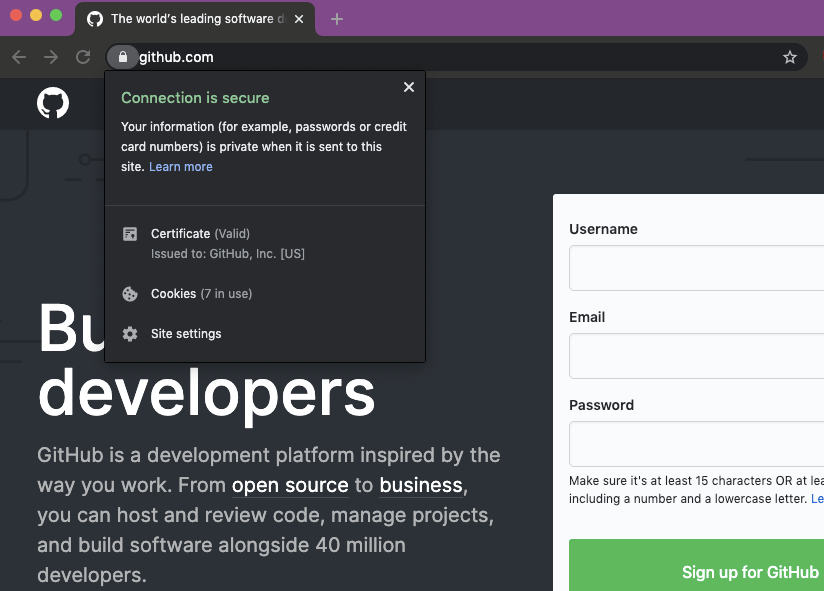

If you’ve received phishing emails related to this phishing campaign, please contact GitHub Support with details about the sender email address and URL of the malicious site to help us respond to this issue.
Currently, we’ve observed the following phishing domains used by the attacker. Most of these are already offline, but the attacker frequently creates new domains and will likely continue to do so:
-
aws-update[.]net
-
corp-github[.]com
-
ensure-https[.]com
-
git-hub[.]co
-
git-secure-service[.]in
-
githb[.]co
-
glt-app[.]net
-
glt-hub[.]com
-
glthub[.]co
-
glthub[.]info
-
glthub[.]net
-
glthubb[.]info
-
glthube[.]app
-
glthubs[.]com
-
glthubs[.]info
-
glthubs[.]net
-
glthubse[.]info
-
slack-app[.]net
-
ssl-connection[.]net
-
sso-github[.]com
-
sts-github[.]com
-
tsl-github[.]com
-
data-github[.]com
-
gilthub[.]com
-
gïthub[.]com
-
githube[.]app
-
githubs[.]info
-
gltgub[.]net
-
glthhubs[.]net
-
gthub[.]co
-
xn--gthub-cta[.]com