Join us October 28-29 in San Francisco or online for GitHub Universe, our flagship developer event uniting people, agents, and the world's code.
Register now
Getting RCE in Chrome with incorrect side effect in the JIT compiler
In this post, I’ll exploit CVE-2023-3420, a type confusion in Chrome that allows remote code execution (RCE) in the renderer sandbox of Chrome by a single visit to a malicious site.
In this post, I’ll explain how to exploit CVE-2023-3420, a type confusion vulnerability in v8 (the Javascript engine of Chrome), that I reported in June 2023 as bug 1452137. The bug was fixed in version 114.0.5735.198/199. It allows remote code execution (RCE) in the renderer sandbox of Chrome by a single visit to a malicious site.
Vulnerabilities like this are often the starting point for a “one-click” exploit, which compromise the victim’s device when they visit a malicious website. A renderer RCE in Chrome allows an attacker to compromise and execute arbitrary code in the Chrome renderer process. The renderer process has limited privilege though, so the attacker then needs to chain such a vulnerability with a second “sandbox escape” vulnerability: either another vulnerability in the Chrome browser process, or a vulnerability in the operating system to compromise either Chrome itself or the device. For example, a chain consisting of a renderer RCE (CVE-2022-3723), a Chrome sandbox escape (CVE-2022-4135), and a kernel bug (CVE-2022-38181) was discovered to be exploited in-the-wild in “Spyware vendors use 0-days and n-days against popular platforms” by Clement Lecigne of the Google Threat Analysis Group.
While many of the most powerful and sophisticated “one-click” attacks are highly targeted and average users may be more at risk from less sophisticated attacks such as phishing, users should still keep Chrome up-to-date and enable automatic updates, as vulnerabilities in v8 can often be exploited relatively quickly by analyzing patches once these are released.
The current vulnerability exists in the JIT compiler in Chrome, which optimizes Javascript functions based on previous knowledge of the input types (for example, number types, array types, etc.). This is called speculative optimization and care must be taken to make sure that these assumptions on the inputs are still valid when the optimized code is used. The complexity of the JIT engine has led to many security issues in the past and has been a popular target for attackers. The phrack article, “Exploiting Logic Bugs in JavaScript JIT Engines” by Samuel Groß is a very good introduction to the topic.
The JIT compiler in Chrome’s v8 Javascript engine is called TurboFan. Javascript functions in Chrome are optimized according to how often they are used. When a Javascript function is first run, bytecode is generated by the interpreter. As the function is called repeatedly with different inputs, feedback about these inputs, such as their types (for example, are they integers, or objects, etc.), is collected. After the function is run enough times, TurboFan uses this feedback to compile optimized code for the function, where assumptions are made based on the feedback to optimize the bytecode. After this, the compiled optimized code is used to execute the function. If these assumptions become incorrect after the function is optimized (for example, new input is used with a type that is different to the feedback), then the function will be deoptimized, and the slower bytecode is used again. Readers can consult, for example, “An Introduction to Speculative Optimization in V8” by Benedikt Meurer for more details of how the compilation process works.
TurboFan itself is a well-studied subject and there is a vast amount of literature out there documenting its inner workings, so I’ll only go through the background that is needed for this article. The article, “Introduction to TurboFan” by Jeremy Fetiveau is a great write-up that covers the basics of TurboFan and will be very useful for understanding the context in this post, although I’ll also cover the necessary material. The phrack article, “Exploiting Logic Bugs in JavaScript JIT Engines” by Samuel Groß also covers many aspects of TurboFan and V8 object layouts that are relevant.
When compiling optimized JIT code, TurboFan first visits each bytecode instruction in the function, and then transforms each of these instructions into a collection of nodes (a process known as reduction), which results in a representation called a “Sea of Nodes.” The nodes are related to each other via dependencies, which are represented as edges in Turbolizer, a tool that is commonly used to visualize the sea of nodes. There are three types of edges: the control edges represent the control flow graph, value edges represent the dataflow graph, and the effect edges, which order nodes according to how they access the state of objects.
For example, in the following:
javascript
x.a = 0x41;
var y = x.a;
x.a = 0x41;
var y = x.a;
The operation y = x.a has an effect dependency on x.a = 0x41 and must be performed after x.a = 0x41 because x.a = 0x41 changes the state of x, which is used in y = x.a. Effect edges are important for eliminating checks in the optimized code.
In Chrome, the memory layout, in particular, the offsets of the fields in an object, is specified by its Map, which can be thought of as the type information of the object, and knowledge of Map from feedback is often used by TurboFan to optimize code. (Readers can consult, for example, “JavaScript engine fundamentals: Shapes and Inline Caches” by Mathias Bynens for more details. For the purpose of this post, however, it is sufficient to know that Map determines the field offsets of an object.)
Let’s look a bit closer at how dependency checks are inserted, using this function as the running example:
javascript
function foo(obj) {
  var y = obj.x;
  obj.x = 1;
  return y;
}
functionfoo(obj) {
var y = obj.x;
obj.x = 1;
return y;
}
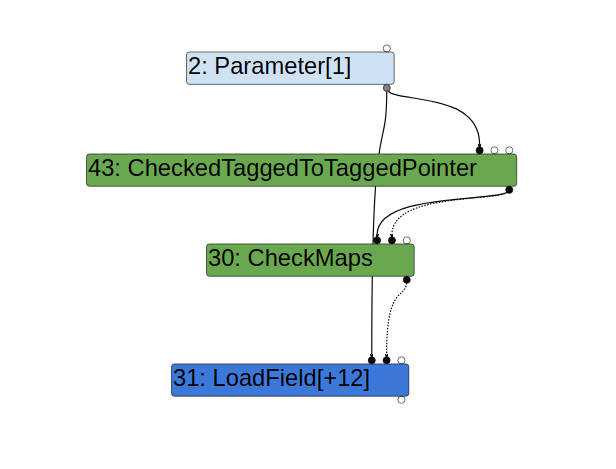
When accessing the field x of obj, TurboFan uses previous inputs of the parameter obj to speculate the memory layout (determined by the Map of obj) and emits optimized code to access x. Of course, obj with a different Map may be used when calling foo after it is optimized, and so a CheckMaps node is created in the function to make sure that obj has the correct memory layout before the field x is accessed by the optimized code. This can be seen in the graph generated from Turbolizer:
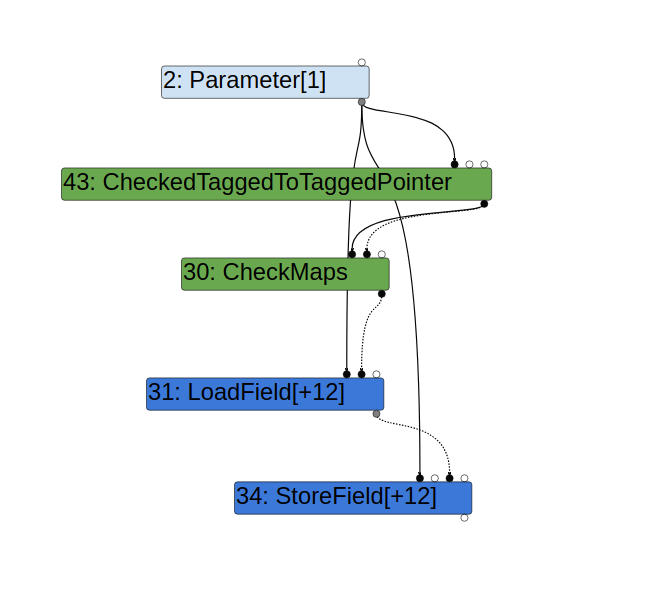
Likewise, when storing to x in the line obj.x = 1, the optimized code assumes obj has the correct map. However, because the map of obj is checked prior to var y = obj.x and there is nothing between these two lines that can change obj, there is no need to recheck the map. Indeed, TurboFan does not generate an extra CheckMaps prior to the StoreField node used in obj.x = 1:
However, nodes can sometimes have side effects, where it may change an object indirectly. For example, a node that invokes a call to a user defined Javascript function can potentially change any object:
javascript
function foo(obj) {
  var y = obj.x;
  callback();
  obj.x = 1;
  return y;
}
functionfoo(obj) {
var y = obj.x;
callback();
obj.x = 1;
return y;
}
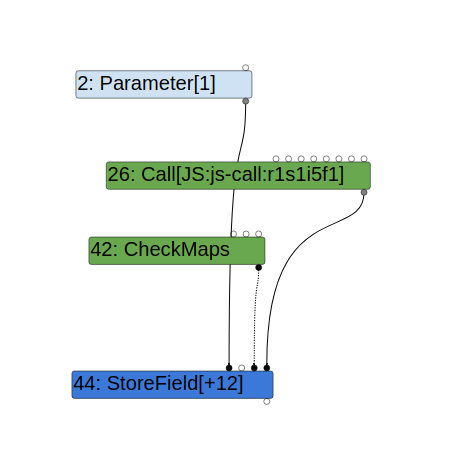
When a function call is inserted between the accesses to x, the map of obj may change after callback is called and so a CheckMaps is needed prior to the store access obj.x = 1:
In TurboFan, side effects of a node are indicated by node properties. In particular, the [kNoWrite](https://source.chromium.org/chromium/chromium/src/+/32a1bb477f7e506c52989a5dd5433567b2d1094e:v8/src/compiler/operator.h;l=45;bpv=0;bpt=0) property indicates that the node has no side effect:
cpp
class V8_EXPORT_PRIVATE Operator : public NON_EXPORTED_BASE(ZoneObject) {
  public:
  ...
  enum Property {
  ...
  kNoWrite = 1 << 4, // Does not modify any Effects and thereby
  // create new scheduling dependencies.
  ...
};
classV8_EXPORT_PRIVATE Operator : publicNON_EXPORTED_BASE(ZoneObject){
public:
...
enumProperty {
...
kNoWrite = 1 << 4, // Does not modify any Effects and thereby// create new scheduling dependencies.
...
};
In the above, the call to callback creates a Call node which has the [kNoProperties](https://source.chromium.org/chromium/chromium/src/+/32a1bb477f7e506c52989a5dd5433567b2d1094e:v8/src/compiler/js-operator.cc;l=885;bpv=0;bpt=0) property, which indicates that it can have side effects (instead of [kNoWrite](https://source.chromium.org/chromium/chromium/src/+/32a1bb477f7e506c52989a5dd5433567b2d1094e:v8/src/compiler/operator.h;l=45;bpv=0;bpt=0), which indicates no side effects).
Assumptions that are made in the optimized code compiled by TurboFan can also become invalid at a later time. In the following example, the function foo has only seen the input a, which has a field x that is constant (that is, the field has not been reassigned):
javascript
var a = {x : 1};

function foo(obj) {
  var y = obj.x;
  return y;
}
%PrepareFunctionForOptimization(foo);
foo(a);
%OptimizeFunctionOnNextCall(foo);
foo(a);
var a = {x : 1};
functionfoo(obj) {
var y = obj.x;
return y;
}
%PrepareFunctionForOptimization(foo);
foo(a);
%OptimizeFunctionOnNextCall(foo);
foo(a);
When TurboFan compiles the function foo, it assumes that the field x of obj is the constant 1 and simply replaces obj.x with 1. However, this assumption can change in a later time. For example, if I reassign the field x in obj after compilation, then the compiled code would become invalid:
javascript
var a = {x : 1};

function foo(obj) {
  var y = obj.x;
  return y;
}
%PrepareFunctionForOptimization(foo);
foo(a);
%OptimizeFunctionOnNextCall(foo);
foo(a);
//Invalidates the optimized code
a.x = 2;
var a = {x : 1};
functionfoo(obj) {
var y = obj.x;
return y;
}
%PrepareFunctionForOptimization(foo);
foo(a);
%OptimizeFunctionOnNextCall(foo);
foo(a);
//Invalidates the optimized code
a.x = 2;
The trace-deopt flag in the standalone d8 binary can be used to check that the code does indeed becomes invalid:
$./d8 --allow-natives-syntax --trace-turbo --trace-deopt foo.js
Concurrent recompilation has been disabled for tracing.
---------------------------------------------------Begin compiling method foo using TurboFan
---------------------------------------------------
Finished compiling method foo using TurboFan
[marking dependent code 0x1a69002021a5 (0x1a690019b9e9 ) (opt id 0) for deoptimization, reason: code dependencies]
$./d8 --allow-natives-syntax --trace-turbo --trace-deopt foo.js
Concurrent recompilation has been disabled for tracing.
---------------------------------------------------
Begin compiling method foo using TurboFan
---------------------------------------------------
Finished compiling method foo using TurboFan
[marking dependent code 0x1a69002021a5  (0x1a690019b9e9 ) (opt id 0) for deoptimization, reason: code dependencies]
Note the last console output, which marks the function `foo` for deoptimization, meaning that the optimized code of `foo` has been invalidated. When `foo` is run after the line `a.x = 2`, the unoptimized code will be used instead. Deoptimization that happens when other code invalidates the optimized function is called "lazy deoptimization" as it only has effect when the function is run next time. Note also that the `reason` for the deoptimization in the last line is `code dependencies`. Code dependencies is a mechanism employed by TurboFan to make sure that optimized code becomes invalid if its assumptions are changed after the code is compiled. Under the hood, code dependencies are implemented via the [`CompilationDependency`](https://source.chromium.org/chromium/chromium/src/+/c9a49f59f2a9f90828978d1e93ee325d08daeb2c:v8/src/compiler/compilation-dependencies.cc;l=72;bpv=0;bpt=0) class. Its subclasses are responsible for making sure that the optimized code is invalidated when the respective assumption becomes invalid. In the above example, the [`FieldConstnessDependency`](https://source.chromium.org/chromium/chromium/src/+/c9a49f59f2a9f90828978d1e93ee325d08daeb2c:v8/src/compiler/compilation-dependencies.cc;l=766;bpv=0;bpt=0) is responsible for invalidating the optimized code when the constant field, `x`, in `obj` is reassigned. The `CompilationDependency` class has three virtual methods, `IsValid`, `PrepareInstall,` and `Install` that are called at the end of the compilation. The `IsValid` method checks that the assumption is still valid at the end of the compilation, while `Install` establishes a mechanism to invalidate the code when the assumption changes. ## [Concurrent compilation](#concurrent-compilation) Concurrent compilation is a feature that was [enabled in version 95](https://chromium.googlesource.com/chromium/src/+/aa37dd99aadf89aa363a96b3c23cecbbeeabfe31) of Chrome. This feature enables TurboFan to compile optimized code in a background thread while the main thread is running other Javascript code. This, however, also gives rise to the possibility of race conditions between compilation and Javascript code executions. On the one hand, Javascript executed in the main thread may invalidate assumptions made during compilation after these assumptions are checked. While many of such issues are prevented by compilation dependencies, this type of race has still resulted in some security issues in the past. (For example, [issue 1369871](https://bugs.chromium.org/p/chromium/issues/detail?id=1369871) issue and [issue 1211215](https://blog.exodusintel.com/2023/05/16/google-chrome-v8-arrayshift-race-condition-remote-code-execution/).) On the other hand, if compilation makes changes to Javascript objects, it may also cause inconsistency in the Javascript code that is running in the main thread. This is a rather unusual situation, as compilation rarely makes changes to Javascript objects. However, the `[PrepareInstall](https://source.chromium.org/chromium/chromium/src/+/c9a49f59f2a9f90828978d1e93ee325d08daeb2c:v8/src/compiler/compilation-dependencies.cc;l=245;bpv=0;bpt=0)` method of the `CompilationDependency`, `PrototypePropertyDependency` calls the `[EnsureHasInitialMap](https://source.chromium.org/chromium/chromium/src/+/c9a49f59f2a9f90828978d1e93ee325d08daeb2c:v8/src/compiler/compilation-dependencies.cc;l=248;bpv=0;bpt=0)` method, which does make changes to `function`, which is a Javascript `Function` object. ```cpp void PrepareInstall(JSHeapBroker* broker) const override { SLOW_DCHECK(IsValid(broker)); Handle function = function_.object(); if (!function->has_initial_map()) JSFunction::EnsureHasInitialMap(function); } ... } ``` Amongst other things, `EnsureHasInitialMap` calls `[Map::SetPrototype](https://source.chromium.org/chromium/chromium/src/+/0cd12c35f217ed6982b34fcb29dc15d14a6e57eb:v8/src/objects/js-function.cc;l=762)` on the `prototype` field of `function`. Calling `Map::SetPrototype` on an object can cause its layout to be optimized via the `[OptimizeAsPrototype](https://source.chromium.org/chromium/chromium/src/+/2bc99709b2731b74aeb95154df133b2499f4211d:v8/src/objects/map.cc;l=2317;bpv=0;bpt=0)` call. In particular, if an object is a "fast" object that stores its fields as an array, `OptimizeAsPrototype` will change it into a "dictionary" object that stores its fields in a dictionary. (See, for example, Section 3.2 in ["Exploiting Logic Bugs in JavaScript JIT Engines](http://www.phrack.org/issues/70/9.html#article),” setting an object as the `__proto__` field has the same effect as calling `Map::SetPrototype` on it.) As explained before, `PrepareInstall` is called at the end of the compilation phase, so initially, I thought this may be exploited as a race condition to create a primitive similar to CVE-2018-17463 detailed in "Exploiting Logic Bugs in JavaScript JIT Engines.” After some debugging, I discovered that the `PrepareInstall` method is actually executed on the main thread and so this is not really a race condition. ## [Interrupt handling in V8](#interrupt-handling-in-v8) Although the `PrepareInstall` method is executed in the main thread, what is interesting is how the main thread switches between different tasks. In particular: how does the background thread notify the main thread to install the compilation dependency after the optimized code is compiled, and when can the main thread switch between normal Javascript execution and handling of tasks requested by other threads? It turns out that this is done via the `[StackGuard::HandleInterrupts](https://source.chromium.org/chromium/chromium/src/+/10e4809ce95862289c62ea30a18ab32bb77ea5c8:v8/src/execution/stack-guard.cc;l=267)` method. In particular, when the compilation is finished in the background, an `INSTALL_CODE` task is put on a queue, which is then handled in `[HandleInterrupts](https://source.chromium.org/chromium/chromium/src/+/10e4809ce95862289c62ea30a18ab32bb77ea5c8:v8/src/execution/stack-guard.cc;l=328)` in the main thread. While the main thread is executing Javascript code, it checks for these interrupts at particular places by calling `StackGuard::HandleInterrupts`. This only happens at a limited number of places, for example, at the entry point of a Javascript function. While looking for callers of `StackGuard::HandleInterrupts`, I discovered that the `StackCheck` node, which has the `[kNoWrite property](https://source.chromium.org/chromium/chromium/src/+/ba1b4d2b303094d63f500878f3670f2235f988c7:v8/src/compiler/js-operator.cc;l=1406)`, can in fact call `StackGuard::HandleInterrupts.` The optimized code for the `StackCheck` can make a call to the `[Runtime::kStackGuard function](https://source.chromium.org/chromium/chromium/src/+/ba1b4d2b303094d63f500878f3670f2235f988c7:v8/src/compiler/js-generic-lowering.cc;l=1197)`: ```cpp void JSGenericLowering::LowerJSStackCheck(Node* node) { Node* effect = NodeProperties::GetEffectInput(node); Node* control = NodeProperties::GetControlInput(node); ... if (stack_check_kind == StackCheckKind::kJSFunctionEntry) { node->InsertInput(zone(), 0, graph()->NewNode(machine()->LoadStackCheckOffset())); ReplaceWithRuntimeCall(node, Runtime::kStackGuardWithGap); } else { ReplaceWithRuntimeCall(node, Runtime::kStackGuard); } } ``` which in turn calls HandleInterrupts: ```cpp RUNTIME_FUNCTION(Runtime_StackGuard) { ... return isolate->stack_guard()->HandleInterrupts( StackGuard::InterruptLevel::kAnyEffect); } ``` As mentioned previously, `kNoWrite` is used to indicate that a node does not make changes to Javascript objects; however, because `StackCheck` can call `HandleInterrupts`, which could cause the `prototype` field object of a function to change from a fast object to a dictionary object, this `kNoWrite` property is incorrect and the `StackCheck` node can be used to change an object and bypass security checks in a way that is similar to [CVE-2018-17463](http://www.phrack.org/issues/70/9.html#article). The problem now is to figure out how to insert a `StackCheck` node in the TurboFan graph. It turns out that the `[JumpLoop](https://source.chromium.org/chromium/chromium/src/+/e72d83c70a3fc4e65fbf66dcb455c288e08b42cd:v8/src/compiler/bytecode-graph-builder.cc;l=3548)` opcode that is inserted at the end of a loop iteration can be used to insert a `StackCheck` node: ```cpp void BytecodeGraphBuilder::VisitJumpLoop() { BuildIterationBodyStackCheck(); BuildJump(); } ``` In the above, `BuildIterationBodyStackCheck` introduces a `StackCheck` node in the graph: ```cpp void BytecodeGraphBuilder::BuildIterationBodyStackCheck() { Node* node = NewNode(javascript()->StackCheck(StackCheckKind::kJSIterationBody)); environment()->RecordAfterState(node, Environment::kAttachFrameState); } ``` The idea is that, if a function is running a loop for a potentially long time, then it should check for interrupts after a number of iterations are run, in case it is blocking other operations. This means that, by creating a loop that runs for a large number of iterations, I can cause an optimized function to handle interrupts and potentially call `EnsureHasInitialMap` to change the layout of a Javascript object. So, to exploit the bug, I need to create two functions with the following properties: 1. A function `bar` that has the `PrototypePropertyDependency` when optimized, so that when `HandleInterrupts` is called, `EnsureHasInitialMap` is called and the `prototype` field of another function `B` (for the purpose of the exploit, I use a class constructor) will change from being a fast object to a dictionary object. 2. A function `foo` with a loop that accesses fields in the `prototype` field of the class constructor `B` both before and after the loop. The optimized code of `foo` that accesses `B.prototype` before the loop will insert a `CheckMaps` node to make sure the `Map` of `B.prototype` is correct. As the loop introduces a `StackCheck` node, it may call `HandleInterrupts`, which will change the `Map` of `B.prototype`. However, because `StackCheck` is marked with `kNoWrite`, a `CheckMaps` will not be inserted again prior to accessing properties of `B.prototype` after the loop. This results in optimized code accessing fields in `B.prototype` with incorrect offsets. 3. Optimize `foo` and wait until concurrent compilation is finished to make sure that `foo` is executed with optimized code from now on. 4. Run `bar` enough times to trigger concurrent compilation, and then run `foo` immediately. As long as the loop in `foo` is running long enough, the compilation of `bar` will finish while the loop is running and the compiler thread will queue an `INSTALL_CODE` task. The loop in `foo` will then handle this interrupt, which will call `EnsureHasInitialMap` for `B` to change `B.prototype` into a dictionary object. After the loop is finished, subsequent accesses to fields of `B.prototype` will be done using the wrong `Map` (by assuming that `B.prototype` is still a fast object). This can then be exploited by causing an out-of-bounds (OOB) access in a Javascript object. ## [Exploiting the bug](#exploiting-the-bug) The function `bar` can be created by looking for nodes that introduce a `PrototypePropertyDependency`, for example, the `[JSOrdinaryHasInstance](https://source.chromium.org/chromium/chromium/src/+/e72d83c70a3fc4e65fbf66dcb455c288e08b42cd:v8/src/compiler/js-native-context-specialization.cc;l=960;bpv=0;bpt=0)` node that is introduced when using `instanceof` in Javascript. So, for example, the following function: ```javascript function bar(x) { return x instanceof B; } ``` will have a `PrototypePropertyDependency` that changes `B.prototype` to a dictionary object when `bar` is installed. The function `foo` can be constructed as follows: ```javascript function foo(obj, proto, x,y) { //Introduce `CheckMaps` for `proto` obj.obj = proto; var z = 0; //Loop for handling interrupt for (let i = 0; i < 1; i++) { for (let j = 0; j < x; j++) { for (let k = 0; k < x; k++) { z = y[k]; } } } //Access after map changed proto.b = 33; return z; } ``` When setting `proto` to an object field that has a fixed map, a `[CheckMaps node is introduced](https://source.chromium.org/chromium/chromium/src/+/070c9a9758adf6ebca735bf73078ec48a254944e:v8/src/compiler/js-native-context-specialization.cc;l=3020)` to make sure that `proto` has the correct map, so by passing a constant `obj` to `foo` of the following form: ```javascript var obj = {obj: B.prototype}; ``` I can introduce the `CheckMaps` node for `B.prototype` that I need in `foo`. After running the loop that handles the interrupt from `bar`, the field write `proto.b = 33` will be writing to `proto` based on its fast map while it has already been changed into a dictionary map. To exploit this, we need to understand the differences in fast objects and dictionary objects. The section "FixedArray and NumberDictionary Memory Layout'' in ["Patch-gapping Google Chrome''](https://blog.exodusintel.com/2019/09/09/patch-gapping-chrome/) gives good details about this. A fast object either stores fields within the object itself—(in-object properties) or in a `PropertyArray` when space runs out for in-object properties. In our case, `B.prototype` does not have any in-object properties and uses a `PropertyArray` to store its fields. A `PropertyArray` has three header fields, `map` and `length` and `hash`, which are at offsets `0`, `4` and `8`. Its elements start at offsets `0xc` and are of size `4`. When optimized code is accessing properties in `B.prototype`, it uses the element offset of the field in the `PropertyArray` to directly access the field. For example, in the following, when loading `B.prototype.a`, optimized code will load the element at offset `0xc` from the `PropertyArray`, and the element at offset `0x10` for the field `b`: ``` class B {} B.prototype.a = 1; B.prototype.b = 2; ``` A dictionary object, on the other hand, stores fields in a `NamedDictionary`. A `NamedDictionary` is implemented using `FixedArray`, however, its element size and header size are different. It has the `map` and `length` fields, but does not have the `hash` field of a `PropertyArray`. In addition, `NamedDictionary` has some extra fields, including `elements`, `deleted` and `capacity`. In particular, when optimized code uses the field offsets from a `PropertyArray` to access a `NamedDictionary`, these extra fields can be overwritten. This, for example, can be used to overwrite the `capacity` of the `NamedDictionary` to cause an out-of-bounds access. 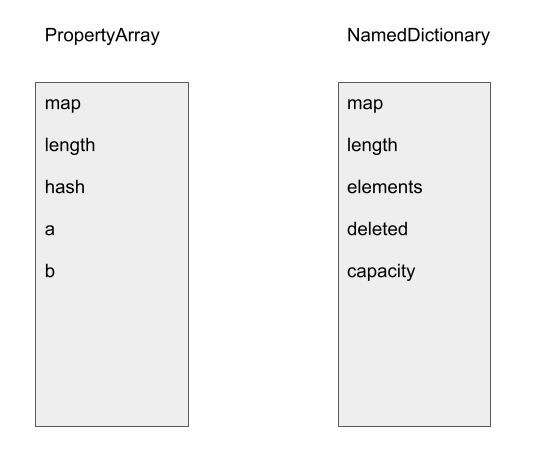 In the above, the field offset for field `b` in a `PropertyArray` aligns with that of `capacity` in the `NamedDictionary` and so writing to `b` will overwrite the `capacity` of the `NamedDictionary`. Since `capacity` is used in most bound calculations when accessing a `NamedDictionary`, this can be used to cause an OOB access. As pointed out in ["Patch-gapping Google Chrome"](https://blog.exodusintel.com/2019/09/09/patch-gapping-chrome/) and ["Exploiting Logic Bugs in JavaScript JIT Engines](http://www.phrack.org/issues/70/9.html#article),” the main problem with exploiting an OOB access in a `NamedDictionary` is that, when looking for a key in the dictionary, a random hash is used to translate the key to an index. This randomness causes the layout of the dictionary to change with each run and accessing properties with the same key is going to result in an access of a random offset in the dictionary, which is unreliable and may result in a crash. To overcome this, I adopted the solution in ["Patch-gapping Google Chrome](https://blog.exodusintel.com/2019/09/09/patch-gapping-chrome/),” which is to set the `capacity` to a power-of-two plus one. This will cause any key access to the dictionary object to either access the `NamedDictionary` at offset `0`, or at offset `capacity`. By placing objects carefully, I can use the dictionary to access an object placed at the offset `capacity`. While this is not 100% reliable, as there is a chance of accessing an object at offset `0`, the failure would not cause a crash and can be easily detected. So, in case of a failure, I just have to reload the page to reinitialize the random hash and try again. (Another way to exploit this is to follow the approach in Section 4 of ["Exploiting Logic Bugs in JavaScript JIT Engines."](http://www.phrack.org/issues/70/9.html#article)) A `NamedDictionary` stores its elements in a tuple of the form `(Key, Value, Attribute)`. When accessing an element with key `k`, the dictionary first converts `k` into an index. In our case, the index is either `0` or the `capacity` of the dictionary. It then checks that the element at the index has the same `Key` as `k`, if it is, `Value` is returned. So, in order to make a successful access, I need to create a fake `NamedDictionary` entry at offset `capacity`. This can be achieved by placing a fast object after the dictionary and using its field values to create the fake entry: a fast object stores its fields in a `PropertyArray`, which stores field values consecutively. By choosing the field values carefully so that the field value at the `capacity` offset of the `NamedDictionary` takes the value of the key `k`, the next value will be returned when the field `k` is accessed in the dictionary object: 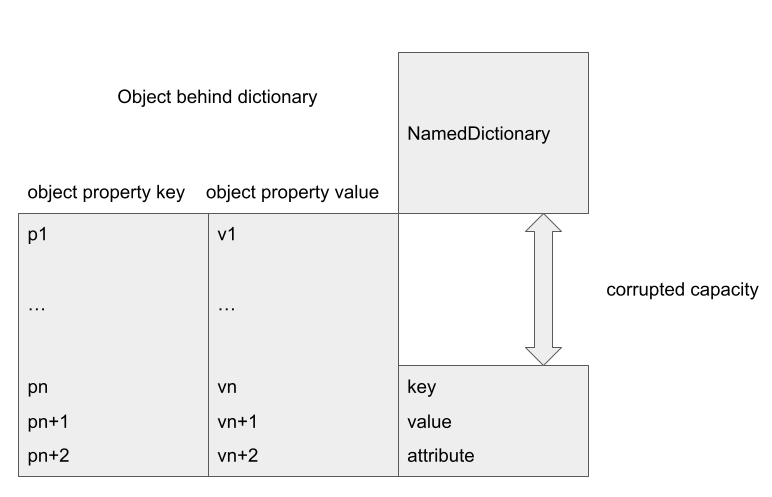 For example, in the above, an object placed after the corrupted `NamedDictionary` will have some of its fields, `vn`, `vn+1` and `vn+2` stored at the offset corresponding to the corrupted `capacity` of the dictionary. Accessing the field with key `k` has a chance of interpreting `vn`, `vn+1` and `vn+2` as a fake element tuple `(Key = vn, value = vn+1, Attribute = vn+2)`. By setting `vn` to `k`, `vn+1` will be returned as the field `k` of the corrupted dictionary object. The significance of this is that I can now use the corrupted dictionary to create a type confusion. ## [Creating type confusion](#creating-type-confusion) The exploit flow now very much follows that of Section 4 in ["Exploiting Logic Bugs in JavaScript JIT Engines](http://www.phrack.org/issues/70/9.html#article).” In order to create a type confusion, I'll use another optimization in TurboFan. When loading an object property, if the property is known to be an object with a fixed `Map`, then TurboFan will omit `CheckMaps` for the property when it is accessed. For example, in the following function: ```javascript function tc(x) { var obj = x.p1.px; obj.x = 100; } var obj0 = {px : {x : 1}}; var obj1 = {p0 : str0, p1 : obj0, p2 : 0}; //optimizing tc for (let i = 0; i < 20000; i++) { tc(obj1); } ``` Because `tc` has only seen `obj1` as an input when it is optimized, a `CheckMaps` will be inserted to check that `x` has the same `Map` as `obj1`. However, as `obj1.p1` has the same `Map` (the `Map` of `obj0`) throughout, a `CheckMaps` is not inserted to check the `Map` of `x.p1`. In this case, the `Map` of `x.p1` is ensured by checking the `Map` of `x`, as well as installing a compilation dependency that prevents it from changing. However, if I am able to use a memory corruption, such as the OOB access I constructed with the dictionary object, to modify the field `p1` in `obj1`, then I can bypass these checks and cause the optimized code to access `obj` with a wrong `Map`. In particular, I can replace `obj0.px` by an `Array` object, causing `obj.x = 100` to overwrite the length of the `Array`: ``` var corrupted_arr = [1.1]; var corrupted = {a : corrupted_arr}; ... //Overwrite `obj1.p1` to `corrupted` Object.defineProperty(B.prototype, 'aaa', {value : corrupted, writable : true}); //obj.x = 100 in `tc` now overwrites length of `corrupted_arr` tc(obj1); ``` In the above, I first use the bug to overwrite the `capacity` of the dictionary object `B.prototype`. I then align objects by placing `obj0` behind `B.prototype`, such that the field `aaa` in `B.prototype` now gives me `obj0.px`. Then, by overwriting `aaa` in `B.prototype`, I can change `obj1.p1` to a different object with a different `Map`. As this change does not involve setting a property in `obj1`, it does not invalidate the optimized code in the function `tc`. So, when `tc` is run again, a type confusion occurs and `obj = x.p1.px` will return `corrupted_arr` and setting `obj.x = 100` will set the `length` of `corrupted_arr` to `100`. 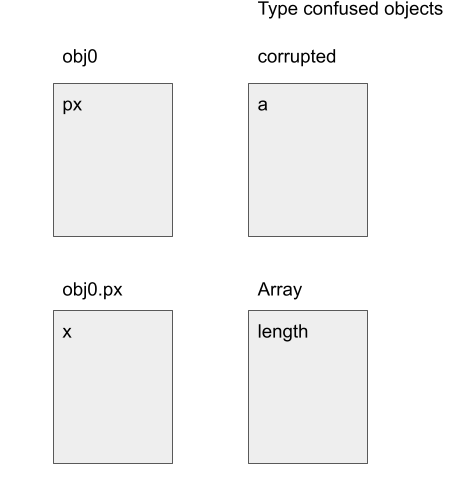 The above figure shows the field alignments between the objects. ## [Gaining code execution](#gaining-code-execution) Once an OOB access of a double array is achieved, the bug can be exploited as follows: 1. Place an `Object` `Array` after `corrupted_arr`, and use the OOB read primitive to read the addresses of the objects stored in this array. This allows me to obtain the address of any V8 object. 2. Place another double array, `writeArr` after `corrupted_arr`, and use the OOB write primitive in `corrupted_arr` to overwrite the `element` field of `writeArr` to an object address. Accessing the elements of `writeArr` then allows me to read/write to arbitrary addresses. 3. While this gives me arbitrary read and write primitives within the V8 heap and also obtains the address of any object, due to the recently introduced [heap sandbox](https://docs.google.com/document/d/1FM4fQmIhEqPG8uGp5o9A-mnPB5BOeScZYpkHjo0KKA8/edit) in V8, the V8 heap becomes fairly isolated and I still won't be able to access arbitrary memory within the renderer process. In particular, I can no longer use the standard method of overwriting the `RWX` pages that are used for storing [WebAssembly](https://webassembly.org/) code to achieve code execution. Instead, [JIT spraying](https://mem2019.github.io/jekyll/update/2022/02/06/DiceCTF-Memory-Hole.html) can be used to bypass the heap sandbox. 4. The idea of JIT spraying is that a pointer to the JIT optimized code of a function is stored in a Javascript `Function` object, by modifying this pointer using arbitrary read and write primitive within the V8 heap, I can make this pointer jump to the middle of the JIT code. If I use data structures, such as a double array, to store shell code as floating point numbers in the JIT code, then jumping to these data structures will allow me to execute arbitrary code. I refer readers to [this post](https://mem2019.github.io/jekyll/update/2022/02/06/DiceCTF-Memory-Hole.html) for more details. The exploit can be found [here](https://github.com/github/securitylab/tree/main/SecurityExploits/Chrome/v8/CVE_2023_3420) with some set up notes. ## [Conclusion](#conclusion) Incorrect side effect modeling has long been a powerful exploit primitive and has been exploited multiple times, for example, in [CVE-2018-17463](http://www.phrack.org/issues/70/9.html#article) and [CVE-2020-6418](https://googleprojectzero.github.io/0days-in-the-wild//0day-RCAs/2020/CVE-2020-6418.html). In this case, the side effect property of the `StackCheck` node has become incorrect due to the introduction of concurrent compilation. This shows how delicate interactions between different and seemingly unrelated parts of Chrome can violate previous assumptions, resulting in often subtle and hard-to-detect issues.
Getting RCE in Chrome with incorrect side effect in the JIT compiler - The GitHub Blog