September has marked plenty of new exciting announcements, and there’s something in store for everyone! You have GHES 3.2 for enterprises, the GitHub Issues beta, plus some big news for students: the GitHub Global Campus student portal is the new way for verified students to connect with their community, find access to industry tools, learn about events, and see assigned coursework all in one place. The education team’s blog post has the details.
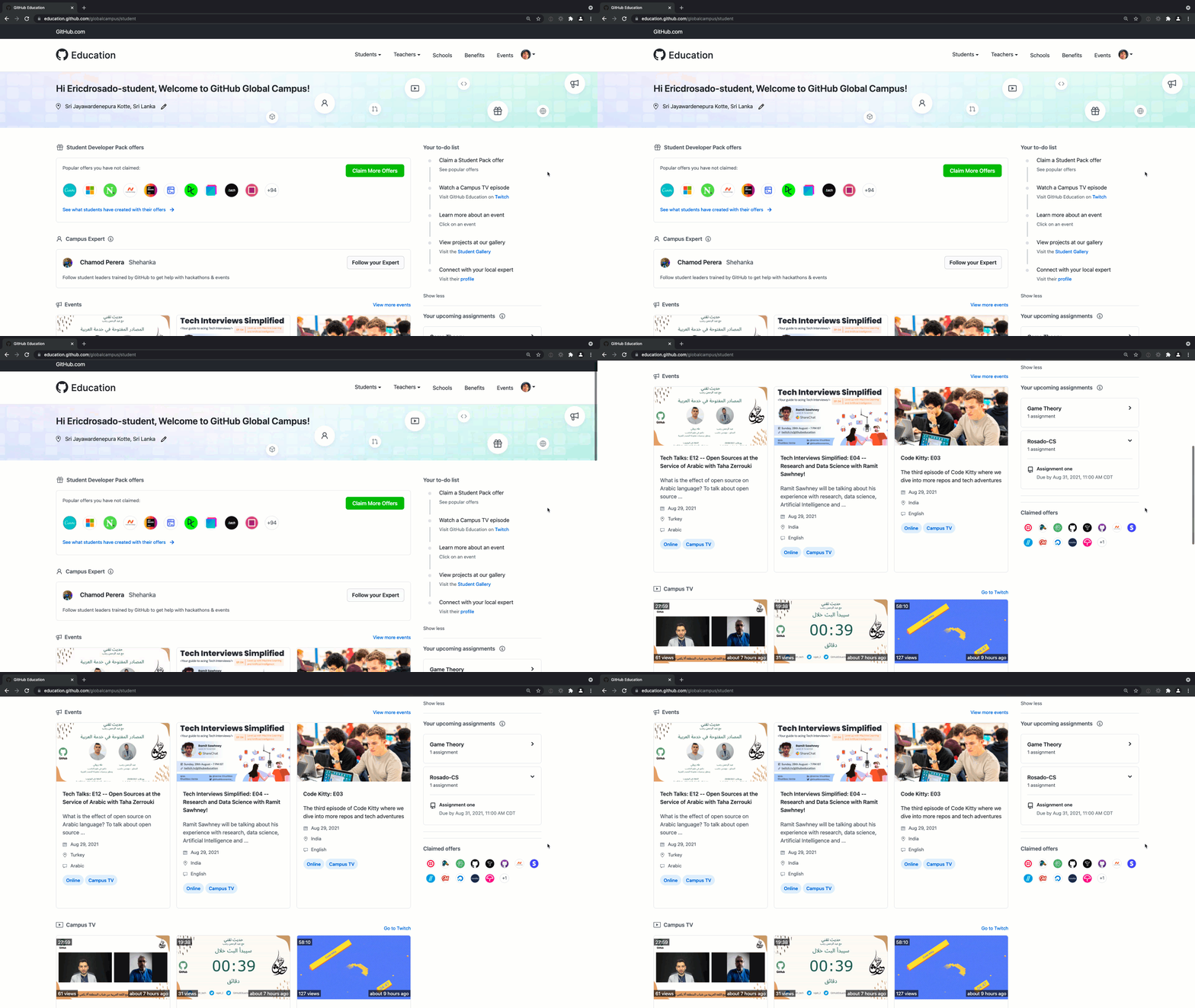
The new one-stop portal for students
You can now display a README.md on your organization’s “Overview” tab that will be publicly visible to everyone. We’re quite proud of GitHub’s. Check out the documentation to set yours up.
Sync a forked, out-of-date repository with its upstream using the merge upstream API (in beta). You can also continue to sync forks through the web UI.
All code on GitHub with tab indent will now render using your preferred tab size! Set your preference in the “Appearance” settings of your user account.

Choose your preferred tab size, from 1-12
The Actions team was busy in September. 😅
- You can now filter workflow runs by date of creation using the
created filter. For example: created:<2021-08-31. It’s also available in the API.
- Using Slack or Microsoft Teams? The GitHub app now provides end-to-end deployment tracking for your Actions environments. You’ll be notified when a review is pending, when an approval is complete, and you can view real-time deployment status. See the GitHub app guidance for Microsoft Teams or Slack.
- You can now use the
setup-node action to cache dependencies for projects with monorepo and pnpm package manager. Use the optional cache-dependency-path field to specify the path to dependency file(s). Check out the repository for more information, or ask questions in the GitHub Actions community.
- GitHub Actions now supports ephemeral (single job) self-hosted runners and a new
workflow_job webhook to make autoscaling your runners easier. Ephemeral runners are a good choice for self-managed environments where you need each job to run on a clean image.
- It’s now easier to manage runner groups and see runner status.
Runners and Runner groups pages offer a summary view or let you hone in on a specific runner to edit it or see what job it’s running. Access these pages from the Actions settings page of your repository or organization.
- GitHub Pages now supports IPv6 for all pages hosted on *.github.io and custom domains. Here’s the documentation for enabling IPv6 with custom domains.
- macOS Big Sur (11) became generally available on GitHub-hosted runners in August 2021. Jobs using the
macos-latest runner label have begun to migrate from Catalina (10.15) to Big Sur (11). Determine if your job has migrated by viewing the Virtual Environment information in the Set up job step of your logs.
- GitHub no longer supports API Authentication via Query Parameters with Actions. See the blog post for details on authenticating API requests to GitHub using the
Authorization header.
GitHub Classroom’s Git and GitHub starter course is out of beta. If you’re already using it, your experience won’t change, but we’ve stabilized the content and removed beta tags. Leave feedback at the Education Community Forum, or get started with our documentation.
For teachers: you can now download a CSV file that contains your students’ GitHub aliases, roster identifiers, and individual grades. See the Changelog entry for instructions.

Download a CSV with your students’ information
It’s now easier to recognize and filter emails that are discussion notifications. Look for (Discussion #xx) in the email title.
The Services Continuity and Incident Management Plan for GitHub Enterprise Cloud is now available as a self-service resource:
- Enterprise owners: download and view GitHub compliance reports from the “Compliance” tab of your enterprise account:
https://github.com/enterprises/**your-enterprise**/settings/compliance
- Enterprise plan organization owners: view the reports from the “Organization security” settings tab of your organization:
https://github.com/organizations/**your-org**/settings/security
Audit log streaming is in public beta for GitHub Enterprise Cloud users. You can set up a stream of audit log and Git events to Splunk or an Azure Event Hub. Audit log streaming ensures that no audit log event will be lost. You can satisfy longer term data retention goals by storing streamed events within your own data collection systems. Learn how to set up your stream.
Enterprise managed users (EMU) is now generally available for GitHub Enterprise Cloud. It gives you administrative tools to manage users and code in the cloud, including centralized user and group management, as well as the ability to create and manage GitHub user accounts for work.
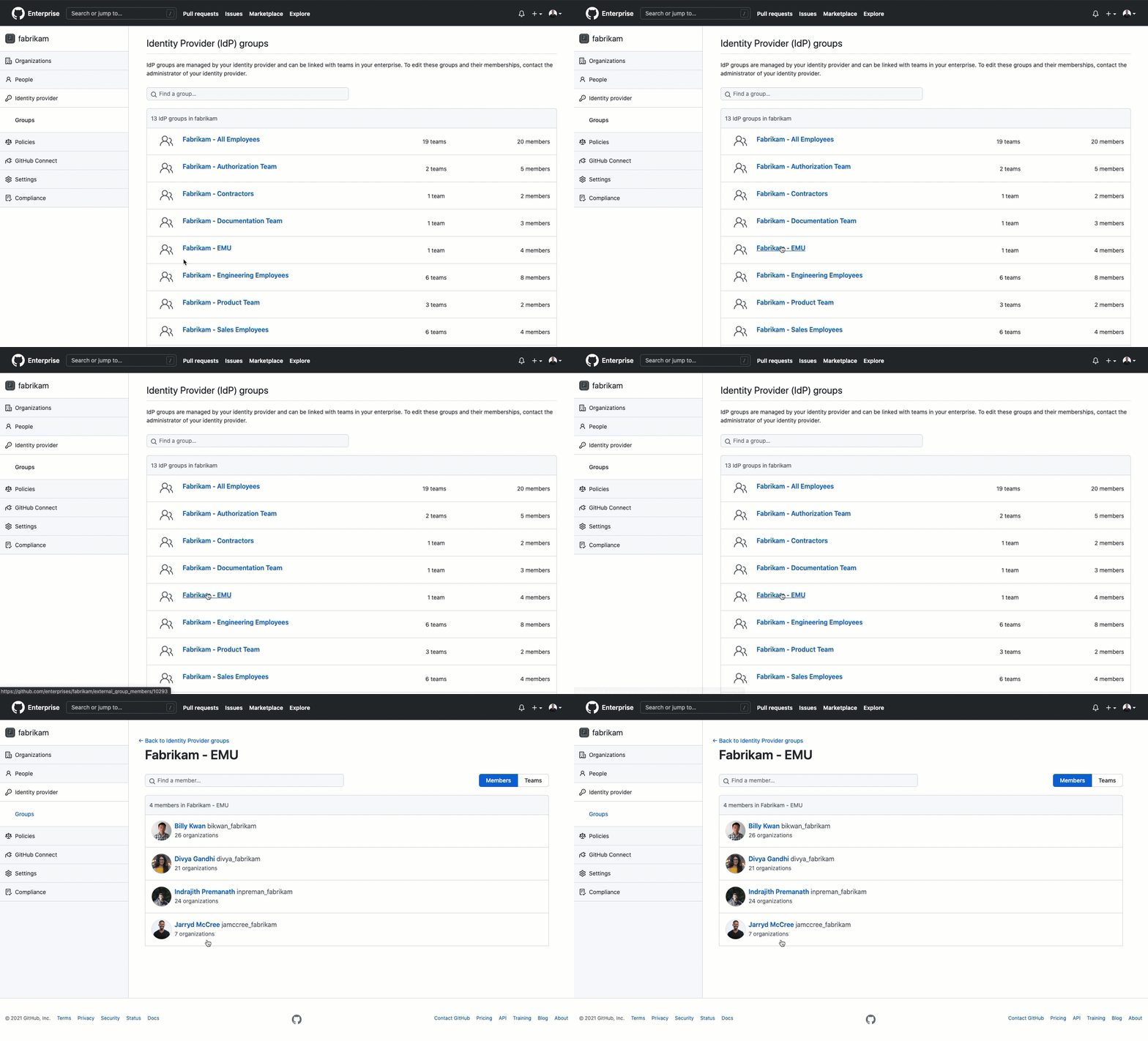
Connect an IdP group with GitHub using enterprise managed users
If you’re an enterprise owner in GitHub Enterprise Cloud, you can now invite GitHub organizations to join your enterprise account. You can also remove existing enterprise-owned organizations. New invitations will require organization owner approval and a final confirmation from an enterprise owner. Learn more about self-service organization transfers.
Enterprise owners can now also toggle Git large file storage (LFS) for a repository via API. Learn more about the API reference in our documentation.
GitHub Enterprise Server 3.2 is generally available for all customers. This release contains more than 70 new features and changes. For more details, read the blog post and release notes.
In September, we made two rounds of updates to the new GitHub Issues (currently in beta). Here are some highlights:
-
You can now bulk select multiple items (in both table and board layouts). You can also bulk delete them.
-
Pick and choose which fields display in your board layout. Maybe you’re a minimalist and just want due dates. Maybe you also want labels, assignees, priorities, and milestones.
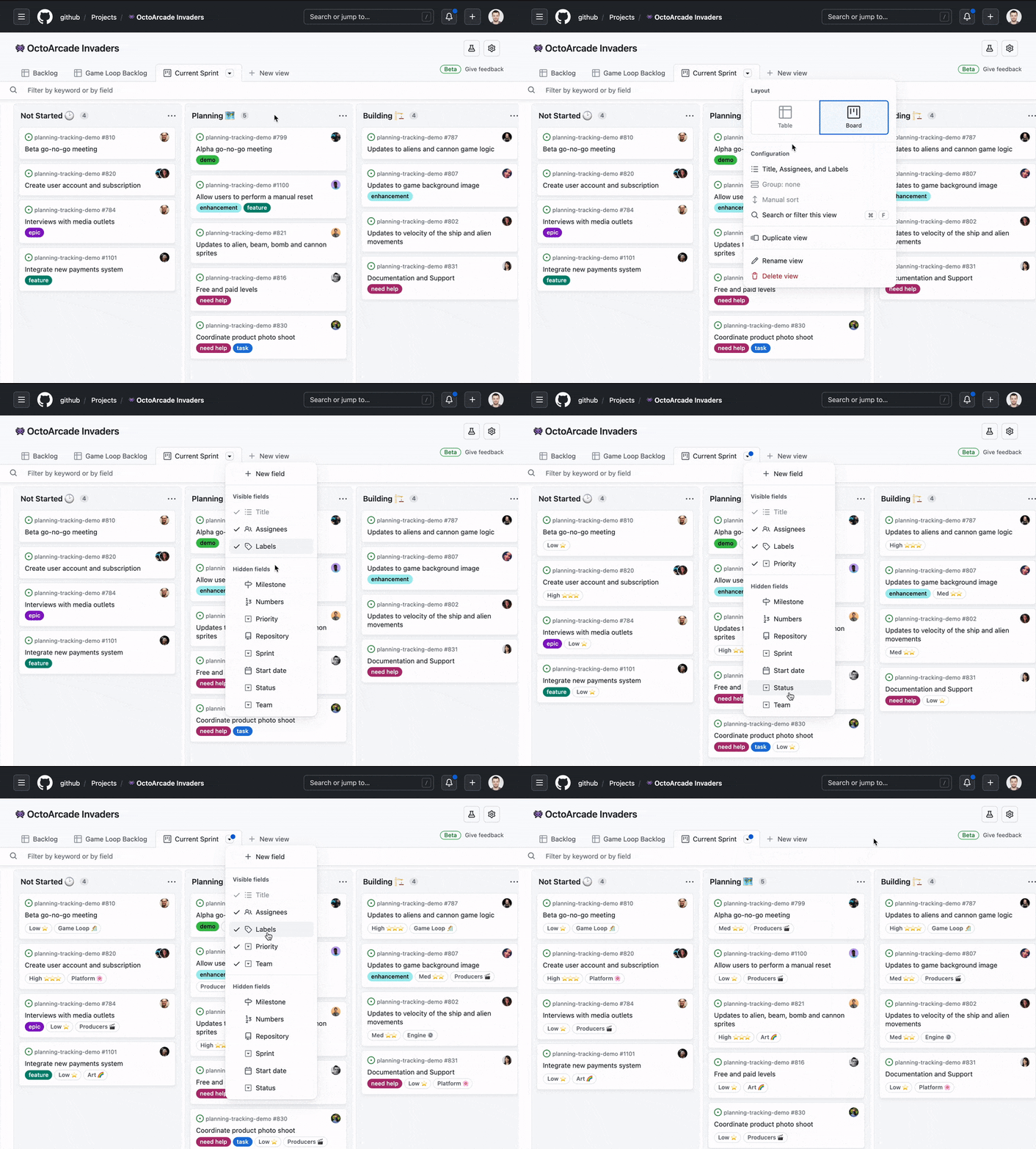
Customize which fields display on your issues in board view
-
Use automated workflows for repetitious project management tasks. There’s a new workflow screen where you can customize conditionals and methods to fit your flow.
-
Finished a task? You can now archive it. This lets you keep context but remove visual clutter.
Learn more on the GitHub Issues page.
Add footnote syntax to any Markdown field! Footnotes display as clickable superscript links that jump to the referenced information. Use them to add background info without disrupting flow.
Here is a simple footnote[^1]. With some additional text after it.
[^1]: My reference.
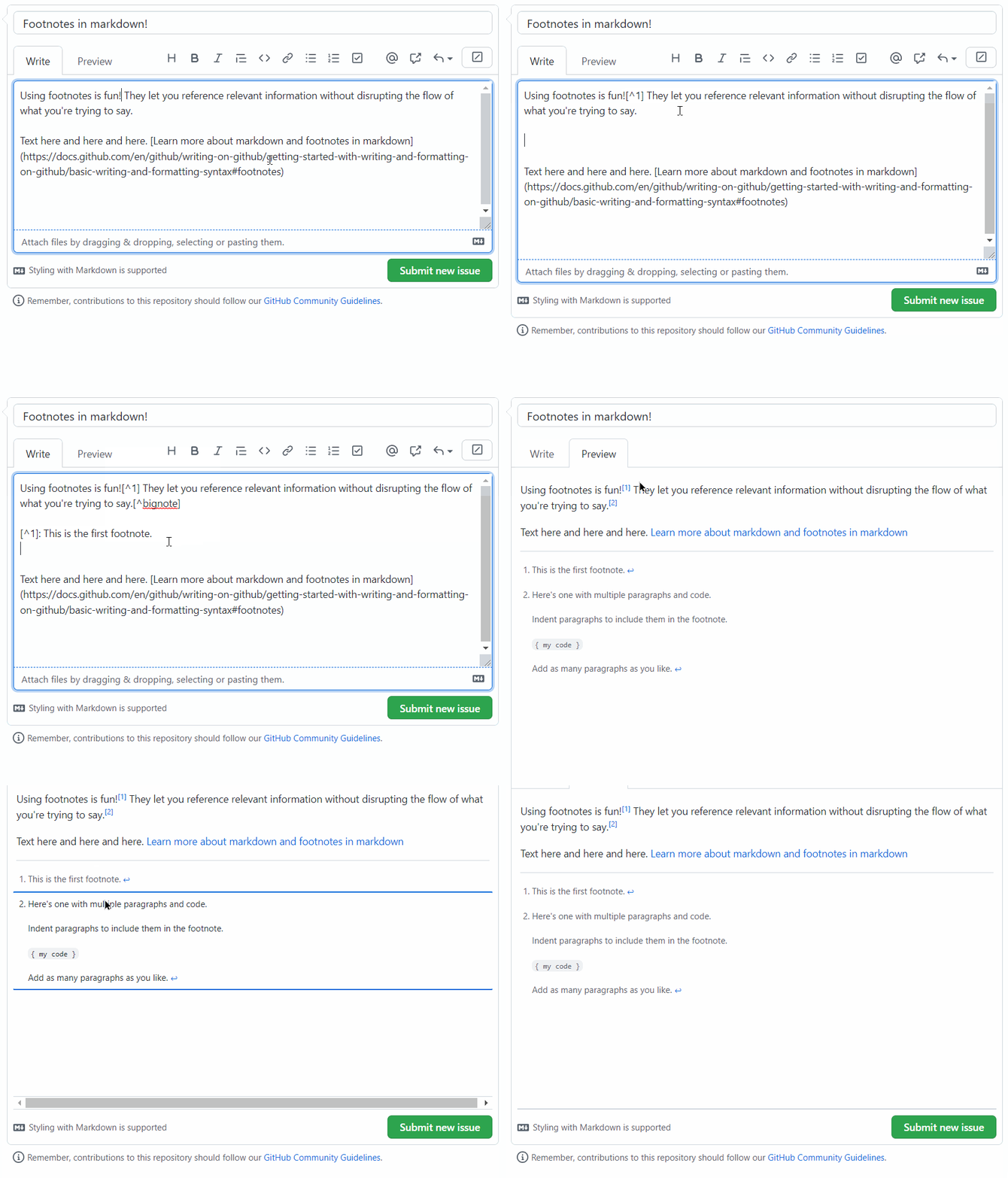
We’re pretty excited about footnotes
Now you can also add images and videos to Markdown files in gists. Paste them into the Markdown body, or select from the dialog at the bottom of the Markdown file. For a list of supported file types, see the documentation.
npm access tokens have a new format! As part of GitHub’s effort to create a more secure supply chain, they now follow the established format of GitHub authentication tokens. Previously, npm access tokens were created as a UUID pattern of 36 characters, which has limitations, such as inaccurate detection of compromised npm tokens in packages and GitHub repositories. Learn more about npm’s new token format in the blog post.
The npm registry upgraded its public CouchDB instance on September 15, 2021. As part of this upgrade, we promoted a new CouchDB replica to become our new public CouchDB instance, https://replicate.npmjs.com. This upgrade resets the CouchDB sequence number. If you aren’t familiar with CouchDB replication, you will not be impacted by this change. In particular, users running npm install or running other commands using the npm CLI will not be affected by this change. See the Changelog entry for details.
At the bottom of each GitHub release, there’s now an avatar list showing the avatars of all GitHub accounts mentioned in the release notes. Learn more about creating releases.

We salute riddlocat and octocat for their contributions
The new GraphQL mutation [createCommitOnBranch](https://docs.github.com/en/graphql/reference/mutations#createcommitonbranch) makes it easier to add, update, and delete files in a branch of a repository. This API offers a simpler way to commit changes compared to the existing Git database REST APIs. You don’t need to manually create blobs and trees before creating the commit. This allows you to add, update, or delete multiple files in a single API call. Commits authored using the new API are automatically GPG signed and are marked as verified in the GitHub UI. GitHub Apps can use the mutation to author commits directly or on behalf of users.
https://github.blog/wp-content/uploads/2021/10/API-commit-authoring-1.mp4#t=0.001
You might already use code review assignment to distribute pull request reviews evenly across your team. Now there are ways to customize review assignment, including the ability to limit assignments to direct team members rather than members of child teams. You can also filter pull request searches to only include pull requests you’ve been directly requested to review. See the Changelog entry for more details.
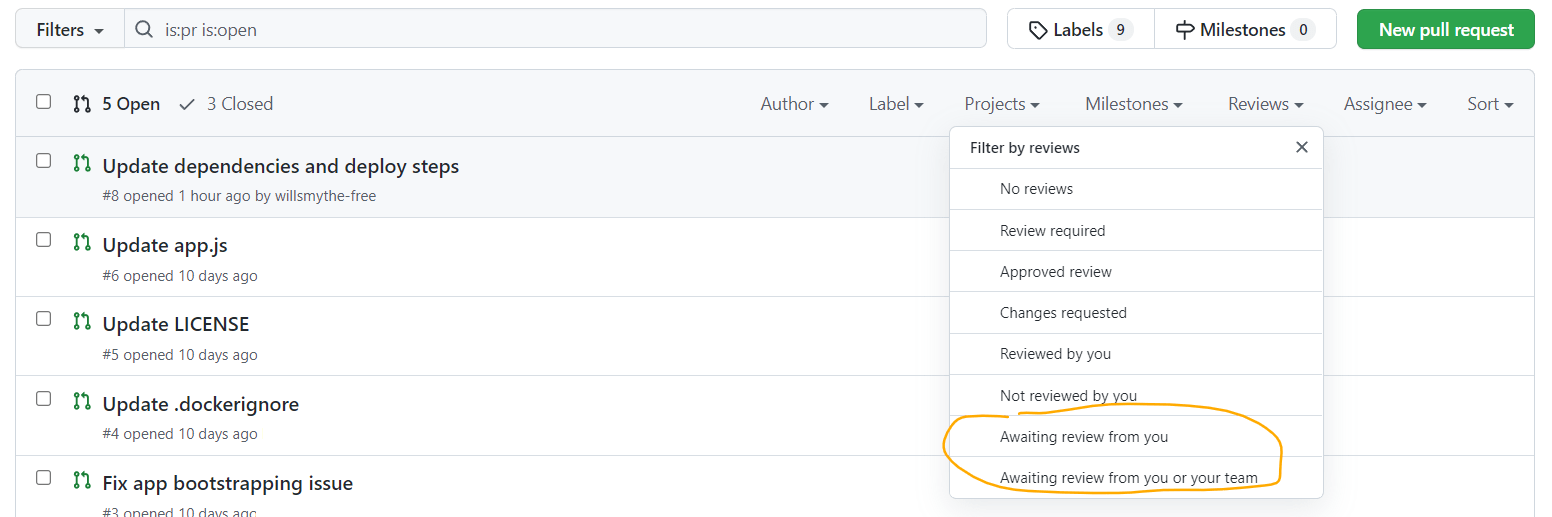
Filter your PRs to just those assigned to you for review
A few more repository management updates:
The GitHub Advisory Database now includes curated Rust security advisories, which expands Advisory Database coverage to eight programming language ecosystems: Composer (PHP), Go, Maven, npm, NuGet, pip, RubyGems, and Rust. So far, we’ve published 317 Rust Security Advisories, and this number will grow as we collect more data from the community. Learn more in the blog post.
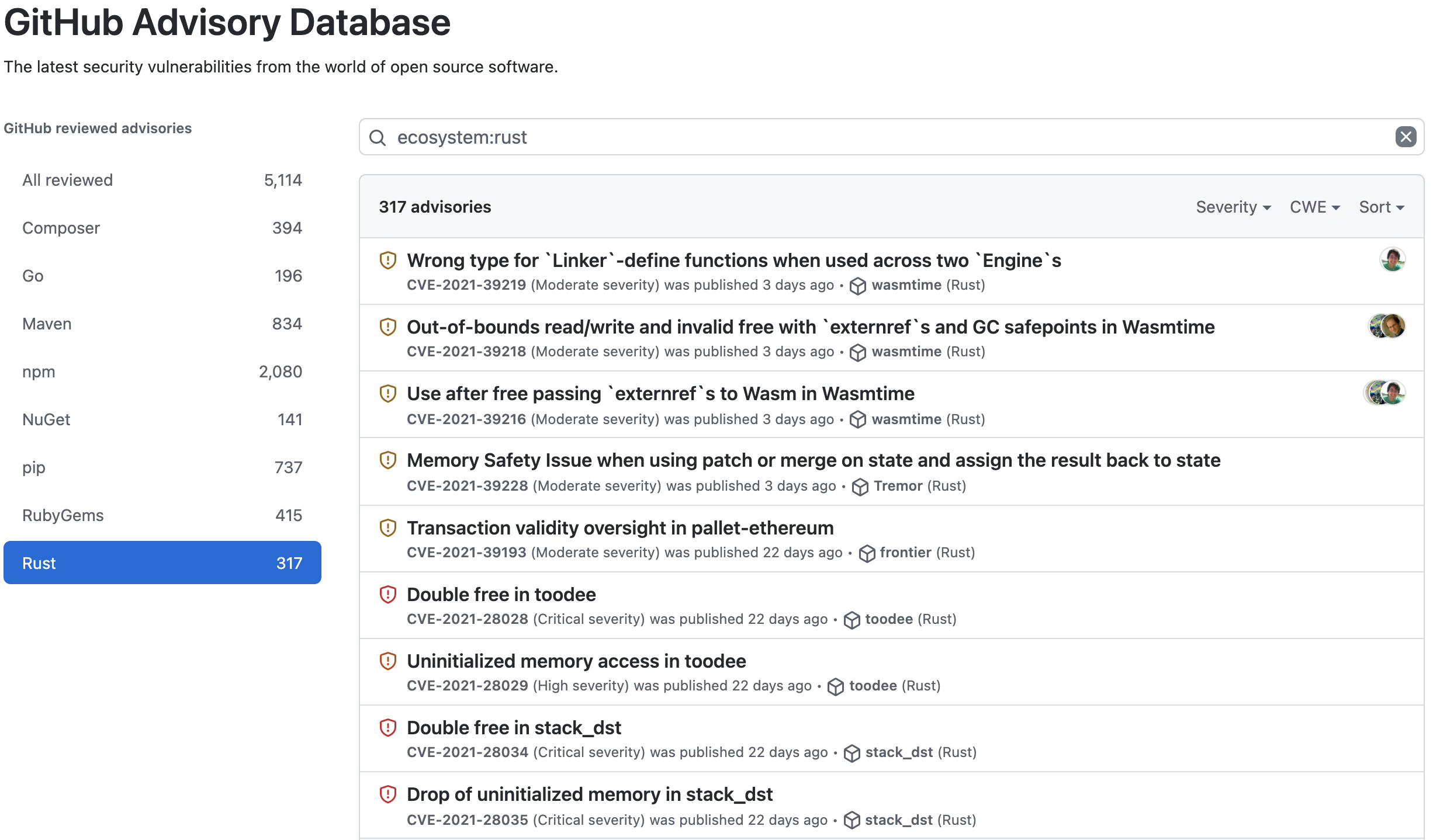
Rust security advisories
In other news, we’re deprecating Recover Accounts Elsewhere, a security setting that allows users to store recovery tokens with a third-party partner as a 2FA recovery method. Effective immediately, we no longer allow new recovery tokens to be stored using Recover Accounts Elsewhere. On December 1, 2021, account recovery tokens stored using Recover Accounts Elsewhere will no longer be accepted as a recovery option. Learn more from the Changelog entry, or read about other account recovery mechanisms.
September saw a few GitHub Secret Scanning updates:
- GitHub Advanced Security users can now edit custom patterns at the repository, organization, and enterprise levels. After you edit and save a pattern, secret scanning searches for matches across the repository’s Git history and in any new commits. Editing a pattern will close alerts previously associated with the pattern if they no longer match the updated version.
- Organization owners can now view secret scanning alerts across their entire organization in the organization security tab.
- Contributed Systems is now a GitHub Secret Scanning partner. Contributed Systems provides open source and commercial background job systems (Sidekiq and Faktory) for business applications written in a variety of programming languages, including Ruby, Go, Python, and JavaScript. If your Contributed Systems credentials are committed to a public repository, we’ll send those matches to them, and they’ll reach out to you directly. Learn more about our partner program.
A few updates for GitHub Code Scanning too:
- In response to customer feedback, we’ve transferred all CodeQL runner functionality natively into the CodeQL CLI. If you’re running CodeQL code scanning on a 3rd party CI/CD system, this means fewer components to install, use, and update. We’re deprecating the CodeQL runner.
- Unable to run analyses using the default
on:pull_request GitHub Actions trigger? We’ve made changes so code scanning is easier for users of other CI/CD platforms, as well as users who can only use the on:push triggers in Actions. In both cases, code scanning alerts can now be configured to show up on pull requests. The Changelog entry has the details.
- We added support for Java 16 standard language features to CodeQL. Code using those features can now benefit from CodeQL’s security analysis as part of code scanning.
Light and dark colorblind-accessible themes are now in public beta. These themes swap colors, such as red and green for orange and blue. Navigate to the “Appearance” page in your profile settings to update your theme preferences.
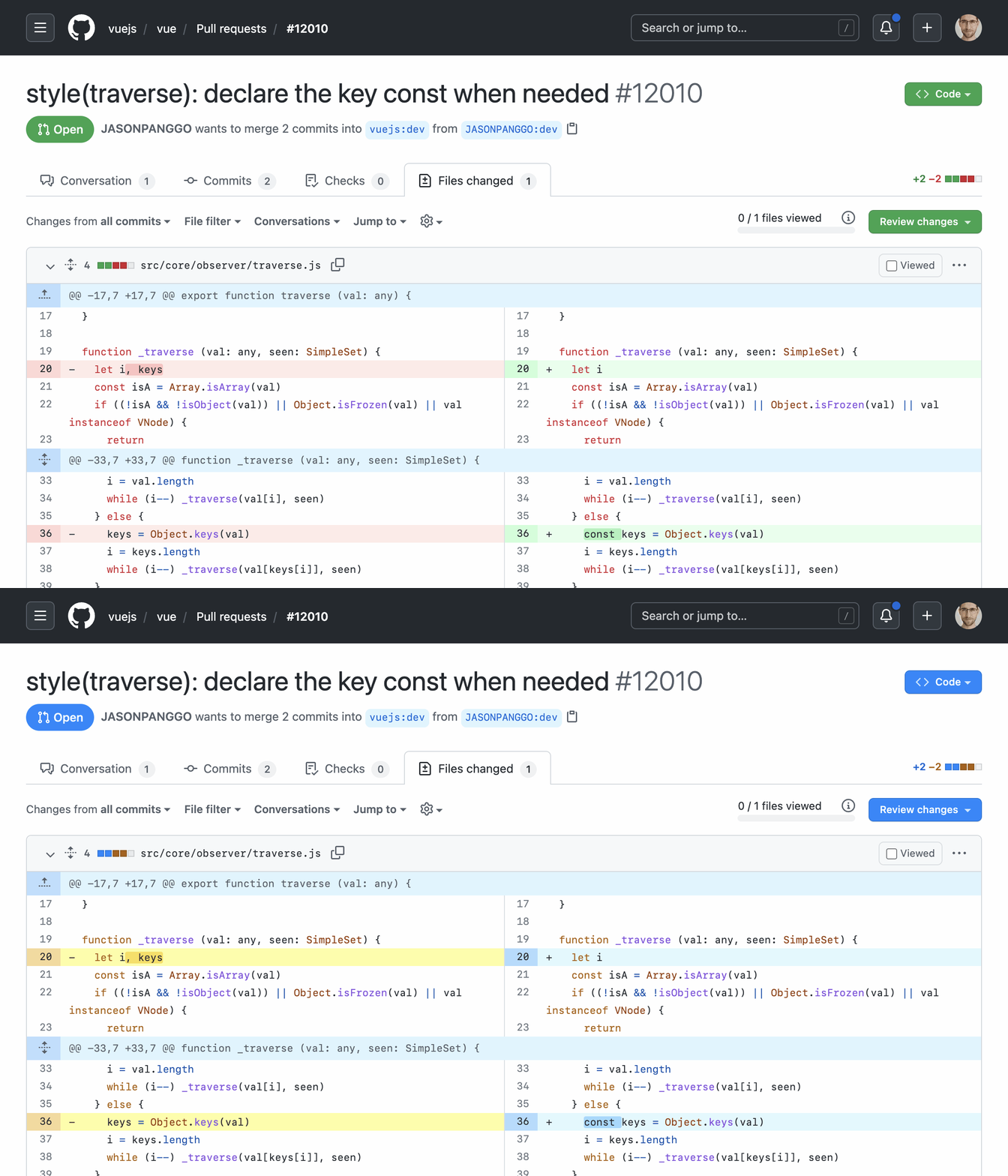
The new theme is colorblind-accessible
For Visual Studio Code users, a GitHub Dark High Contrast theme that matches the official GitHub.com theme is now available. To use it, go to the Visual Studio Marketplace, click Install, and select your theme in Visual Studio Code.
Take a look at our public roadmap for what’s coming next, follow GitHub Changelog on Twitter, and check back on the GitHub Blog for another recap next month.