Maintainers of GitHub repositories can now use Category Forms to create templates for their discussions, which means that users can start new discussions with all the necessary information already included. Now, maintainers can triage discussions more easily and reduce their workload.
That’s not all! The new feature also makes it easier for users to create content. When creating new discussions, users will always remember to include relevant information, with no worry about forgetting something important. With Category Forms, users just need to fill in the required fields and hit “submit,” and their discussion will be ready to go.
Similar to Issue Forms, maintainers can create a discussion template, which will live in .github/DISCUSSION_TEMPLATE/. Each template will map 1:1 with the available Discussion Categories slugs. For example, the template for the “Announcements” category will be .github/DISCUSSION_TEMPLATE/announcements.yml
Users of GitHub Discussions won’t need to do anything differently to use Category Forms. To see the feature in action from the perspective of a user, check out how GitHub is leveraging them in our community here. Click “New Discussion” to see how we categorize and templatize posts from our community.
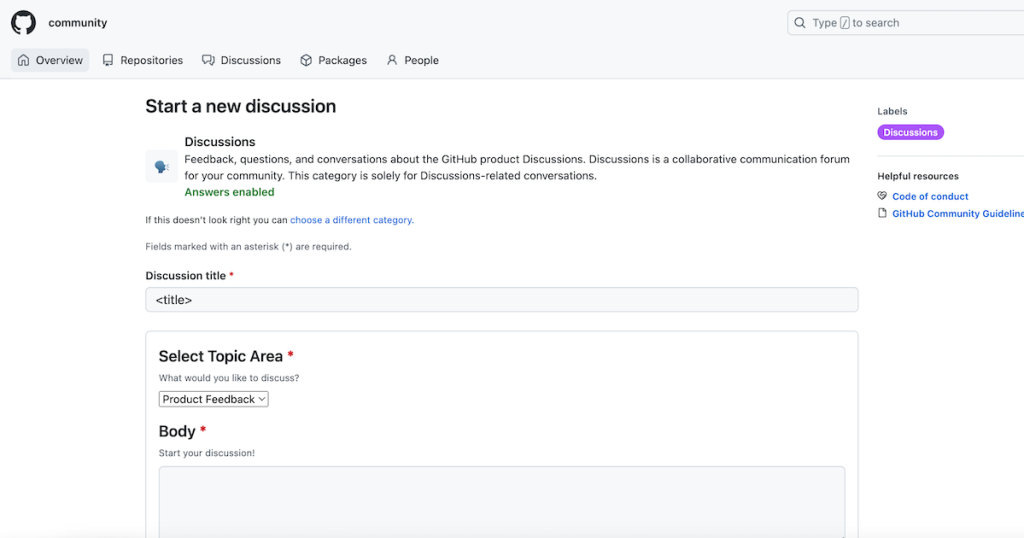
We envision the feature being used in a number of ways, for example:
- The maintainer of a JavaScript library could create a template for bug reports, which includes fields for the user’s browser and operating system, a description of the bug, and reproduction steps.
- A maintainer of a design repository could create a template for feedback on design changes, which includes fields for the specific design being discussed, the user’s feedback, and any suggestions for improvement.
- A maintainer of an open source project could create a template for feature requests, which includes fields for the proposed feature, the use case for the feature, and the benefits it would provide.
The possibilities are endless, and we encourage all maintainers to try out the new feature and see how it can improve their discussions. Get started by reading the docs right here!