From automating repetitive tasks to building continuous integration and continuous deployment pipelines, you can do a lot with GitHub Actions.
But until recently, you had to copy and paste YAML files from one repository to another if you wanted to use them in more than one place.
Enter reusable workflows, which officially launched in 2021 and offer a simple and powerful way to avoid copying and pasting workflows across your repositories.
Below, I’ll go over some of the benefits of reusable workflows and how to use them. I’ll also talk through how reusable workflows are different from composite actions and some current limitations.
New to GitHub Actions?
If you haven’t used Actions before, don’t start your learning journey with reusable workflows. It will drive you crazy. Try learning more about GitHub Actions first in our guide (and then maybe try doing even more things with them).
Reusable workflows are … reusable. Reusable workflows let you DRY (don’t repeat yourself) your Actions configurations, so you don’t need to copy and paste your workflows from one repository to another.
Case in point: if you have three different Node applications and you’re building them all the same way, you can use one reusable workflow instead of copying and pasting your workflows again and again.
Reusable workflows can enforce context consistency across environments. When combined with OpenID Connect, reusable workflows allow you to require certain tests to be run before code can be deployed to production.
Let’s say, for example, that you have a cloud-hosted database and your applications are going to run database migrations when they’re deployed. You can put a policy in front of that database requiring that a specific reusable workflow is used before any deployment.
You can also pass data such as job information or passwords to a reusable workflow by using inputs and secret triggers. Inputs are used to pass non-sensitive information while secrets are used to pass along sensitive information such as passwords and credentials. You can learn more about that in our docs.
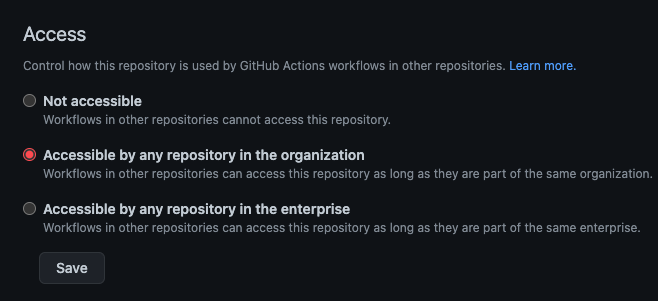
After you add a workflow_call trigger, you need to make sure that your repositories in your organization have access to it. To do this, go to your repository settings, select Actions, and enable access to repositories in your organization.
Enabling access for GitHub Actions at the organization level
A real-world example with reusable workflows
While building a new repository to develop hot.opensauced.pizza, I needed to centralize my GitHub Actions compliance workflows (and avoid copying and pasting because who wants to do that when they can avoid it?).
To do this, I added a workflow_call trigger to my original YAML workflow file in my open-sauced repository. You can see that here in my YAML file—or in the code snippet below.
name: Compliance

on:
  pull_request_target:
    types:
      - opened
      - edited
      - synchronize
      - reopened
  workflow_call:
Next, I built a new YAML workflow in my hot.opensauced.pizza repository and had it call back to my reusable compliance workflow. It looked like this (and you can check out the YAML file here):
name: "Compliance"

on:
  pull_request_target:
    types:
      - opened
      - edited
      - synchronize

permissions:
  pull-requests: write

jobs:
  compliance:
    uses: open-sauced/open-sauced/.github/workflows/compliance.yml@main
Why this matters: Reusable workflows helped provide consistency across my projects and made my life easier. By copying and pasting a few key YAML files from one project to another, I was immediately good to go on day one.
You can’t reference a reusable workflow that’s in a private repository. If you have a reusable workflow in a private repository, only other workflows in that private repository can use it.
Reusable workflows can be nested. From within a reusable workflow you can call another reusable workflow and you can connect up to four levels of workflows.
When we launched reusable workflows, one of the first questions we got was around how they’re different from composite actions.
For the uninitiated, composite actions enable you to combine multiple actions into a single action that you can then insert into any workflow. This means you can refactor long YAML workflow files into much smaller files—and you can also save yourself a fair amount of copying and pasting. Plus, if something like your credentials change, you won’t have to update an entire YAML file.
In practice, there are kinds of problems you can solve with either reusable workflows or a composite workflow. Both approaches have individual strengths and weaknesses. 80% of the time you can probably use either one. But 20% of the time, you’ll need to use one or the other.
For example, if your job needs to run on a specific runner or machine, you need to use reusable workflows. Composite actions don’t specify this type of thing. Composite actions are intended to be more isolated and generic.
Can be nested to have up to 10 composite actions in one workflow
Can use secrets
Cannot use secrets
Can use if: conditionals
Cannot use if: conditionals
Can be stored as normal YAML files in your project
Requires individual folders for each composite action
Can use multiple jobs
Cannot use multiple jobs
Each step is logged in real-time
Logged as one step even if it contains multiple steps
With reusable workflows, you can have multiple jobs and that gives you a lot of more granular control—and power. They allow you to specify any number of things and customize them more to your liking.
Reusable workflows also don’t require individual folders for each workflow like composite actions do. This can make using reusable workflows simpler since you can avoid nesting a bunch of different folders like you’d need to do with composite actions.
The more things you can do to follow the DRY principle, the better. Reusable workflows make it simple to spin up new repositories and projects and immediately start using automation and CI/CD workflows with GitHub Actions that you know will work. That saves you time, and it lets you focus more on what’s important: writing great code.