Join us October 28-29 in San Francisco or online for GitHub Universe, our flagship developer event uniting people, agents, and the world's code.
Register now
New GitHub CLI extension tools
Support for GitHub CLI extensions has been expanded with new authorship tools and more ways to discover and install custom commands. Learn how to write powerful extensions in Go and find new commands to install.
Since the GitHub CLI 2.0 release, developers and organizations have customized their CLI experience by developing and installing extensions. Since then, the CLI team has been busy shipping several new features to further enhance the experience for both extension consumers and authors. Additionally, we’ve shipped go-gh 1.0 release, a Go library giving extension authors access to the same code that powers the GitHub CLI itself. Finally, the CLI team released the gh/pre-extension-precompile action, which automates the compilation and release of Go, Rust, or C++ extensions.
This blog post provides a tour of what’s new, including an in-depth look at writing a CLI extension with Go.
In the 2.20.0 release of the GitHub CLI, we shipped two new commands, including gh extension browse and gh extension search, to make discovery of extensions easier (all extension commands are aliased under gh ext, so the rest of this post will use that shortened version).
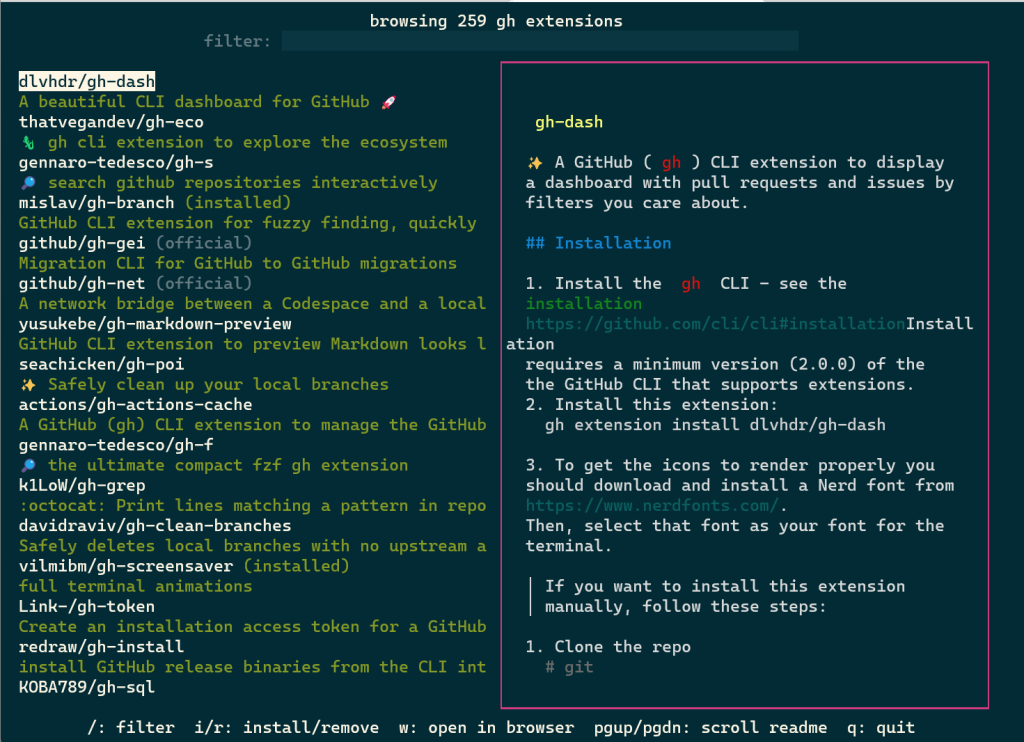
gh ext browse is a new kind of command for the GitHub CLI: a fully interactive Terminal User Interface (TUI). It allows users to explore published extensions interactively right in the terminal.
Once gh ext browse has launched and loads extension data, you can browse through all of the GitHub CLI extensions available for installation sorted by star count by pressing the up and down arrows (or k and j).
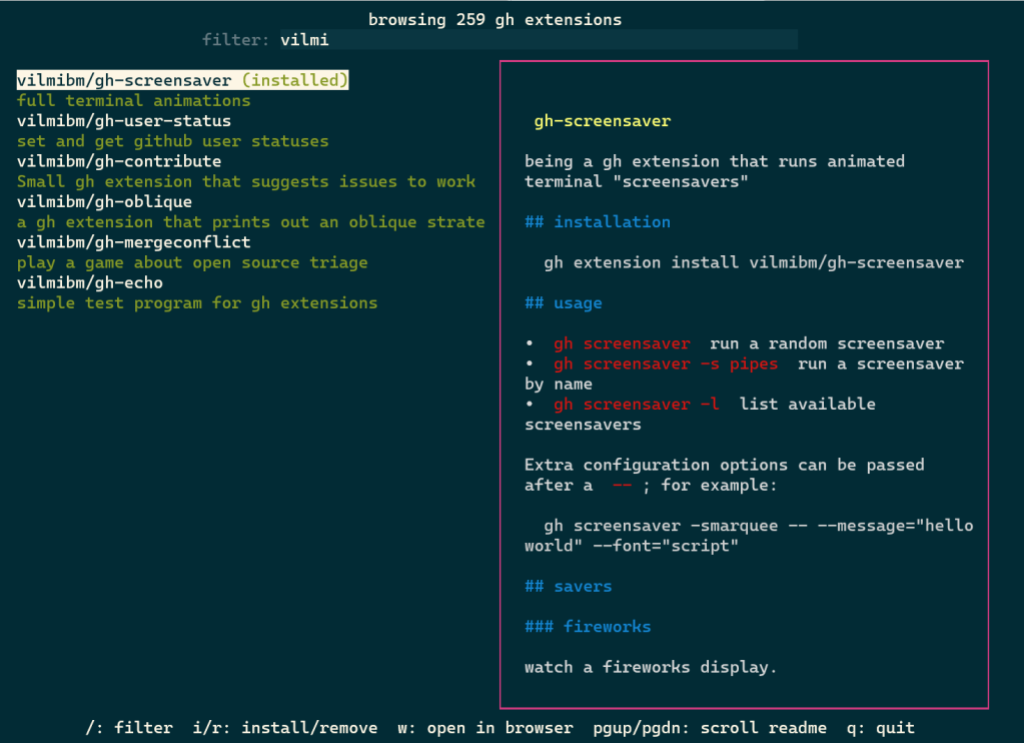
Pressing / focuses the filter box, allowing you to trim the list down to a search term.
You can select any extension by highlighting it. The selected extension can be installed by pressing i or uninstalled by pressing r. Pressing w will open the currently highlighted extension’s repository page on GitHub in your web browser.
Our hope is that this is a more enjoyable and easy way to discover new extensions and we’d love to hear feedback on the approach we took with this command.
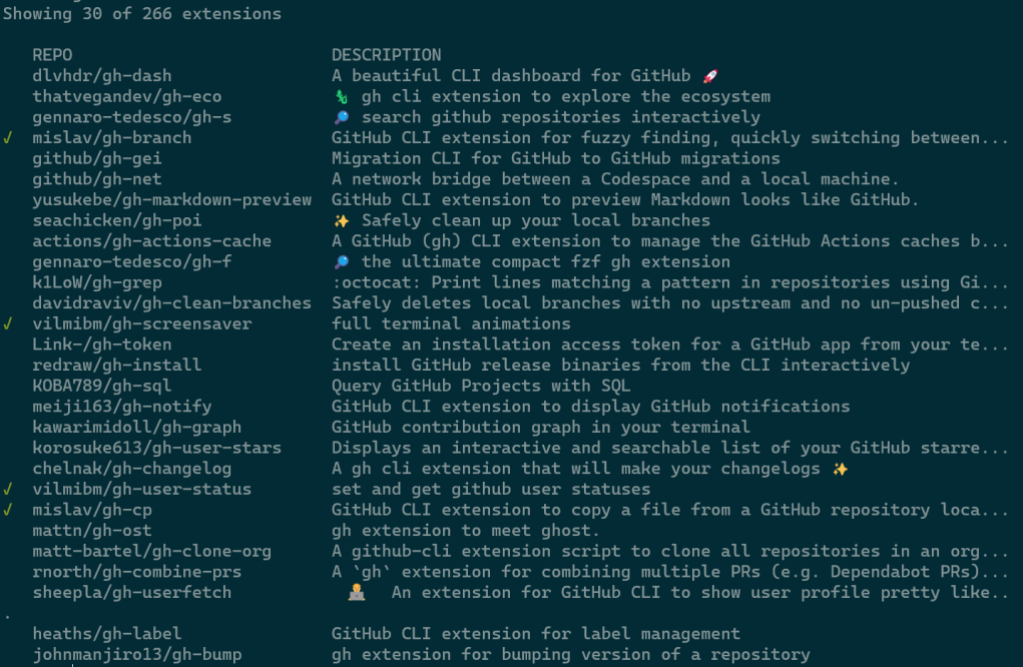
In tandem with gh ext browse we’ve shipped another new command intended for scripting and automation: gh ext search. This is a classic CLI command which, with no arguments, prints out the first 30 extensions available to install sorted by star count.
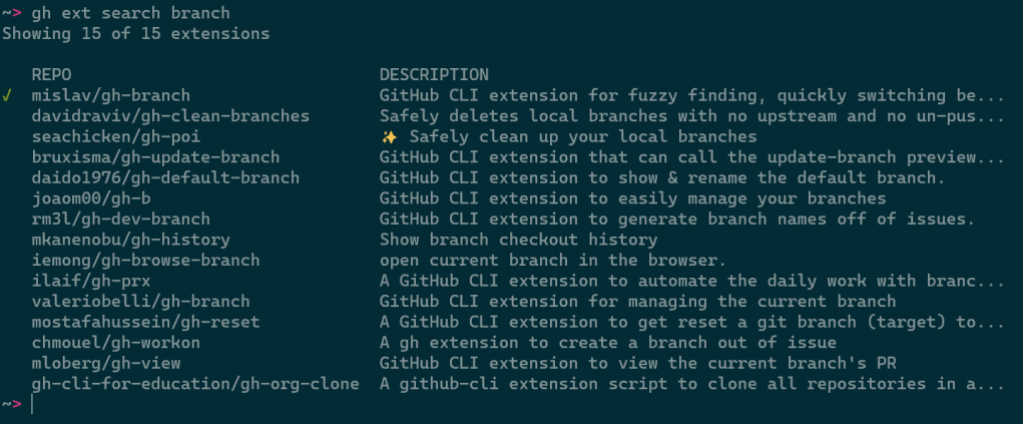
A green check mark on the left indicates that an extension is installed locally.
Any arguments provided narrow the search results:
Results can be further refined and processed with flags, like:
--limit, for fetching more results
--owner, for only returning extensions by a certain author
--sort, for example for sorting by updated
--license, to filter extensions by software license
--web, for opening search results in your web browser
--json, for returning results as JSON
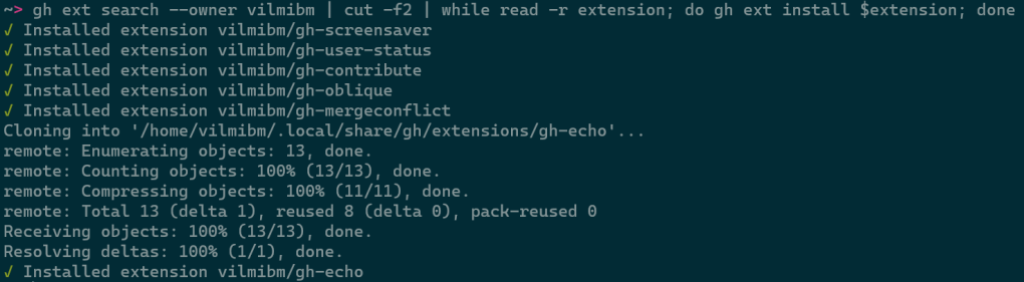
This command is intended to be scripted and will produce composable output if piped. For example, you could install all of the extensions I have written with:
The CLI team wanted to accelerate extension development by putting some of the GitHub CLI’s own code into an external library called go-gh for use by extension authors. The GitHub CLI itself is powered by go-gh, ensuring that it is held to a high standard of quality. This library is written in Go just like the CLI itself.
To demonstrate how to make use of this library, I’m going to walk through building an extension from the ground up. I’ll be developing a command called askfor quickly searching the threads in GitHub Discussions. The end result of this exercise lives on GitHub if you want to see the full example.
Getting started
First, I’ll run gh ext create to get started. I’ll fill in the prompts to name my command “ask” and request scaffolding for a Go project.
Before I edit anything, it would be nice to have this repository on GitHub. I’ll cd gh-ask and run gh repo create, selecting Push an existing local repository to GitHub, and follow the subsequent prompts. It’s okay to make this new repository private for now even if you intend to make it public later; private repositories can still be installed locally with gh ext install but will be unavailable to anyone without read access to that repository.
The initial code
Opening main.go in my editor, I’ll see the boilerplate that gh ext create made for us:
package main
import (
"fmt"
"github.com/cli/go-gh"
"github.com/cli/go-gh"
)
func main() {
fmt.Println("hi world, this is the gh-ask extension!")
client, err := gh.RESTClient(nil)
if err != nil {
fmt.Println(err)
return
}
response := struct {Login string}{}
err = client.Get("user", &response)
if err != nil {
fmt.Println(err)
return
}
fmt.Printf("running as %s\n", response.Login)
}
go-gh has already been imported for us and there is an example of its RESTClient function being used.
An aside about authentication
The boilerplate example above does nothing to authenticate against the GitHub API and, yet, I can run it with success. This happens because go-gh reads the exact same authentication configuration that the GitHub CLI has already established. If I were to run gh auth logout, the extension would no longer work. If you want to write an extension that doesn’t rely on the GitHub CLI already having logged in a user, you’ll need to also set up authentication details and pass them to functions like RESTClient.
Selecting a repository
The goal with this extension is to get a glimpse into threads in a GitHub repository’s discussion area that might be relevant to a particular question. It should work something like this:
$ gh ask actions
…a list of relevant threads from whatever repository you're in locally…

$ gh ask --repo cli/cli ansi
…a list of relevant threads from the cli/cli repository…
$ gh ask actions
…a list of relevant threads from whatever repository you're in locally…

$ gh ask --repo cli/cli ansi
…a list of relevant threads from the cli/cli repository…
First, I’ll make sure that a repository can be selected. I’ll also remove stuff we don’t need right now from the initial boilerplate.
go
package main

import (
        "flag"
        "fmt"
        "os"

        "github.com/cli/go-gh"
        "github.com/cli/go-gh/pkg/repository"
)

func main() {
    if err := cli(); err != nil {
            fmt.Fprintf(os.Stderr, "gh-ask failed: %s\n", err.Error())
            os.Exit(1)
    }
}

func cli() {
        repoOverride := flag.String(
        "repo", "", "Specify a repository. If omitted, uses current repository")
        flag.Parse()

        var repo repository.Repository
        var err error

        if *repoOverride == "" {
                repo, err = gh.CurrentRepository()
        } else {
                repo, err = repository.Parse(*repoOverride)
        }
        if err != nil {
                return fmt.Errorf("could not determine what repo to use: %w", err.Error())

        }

        fmt.Printf(
       "Going to search discussions in %s/%s\n", repo.Owner(), repo.Name())

}
package main
import (
"flag""fmt""os""github.com/cli/go-gh""github.com/cli/go-gh/pkg/repository"
)
funcmain() {
if err := cli(); err != nil {
fmt.Fprintf(os.Stderr, "gh-ask failed: %s\n", err.Error())
os.Exit(1)
}
}
funccli() {
repoOverride := flag.String(
"repo", "", "Specify a repository. If omitted, uses current repository")
flag.Parse()
var repo repository.Repository
var err errorif *repoOverride == "" {
repo, err = gh.CurrentRepository()
} else {
repo, err = repository.Parse(*repoOverride)
}
if err != nil {
return fmt.Errorf("could not determine what repo to use: %w", err.Error())
}
fmt.Printf(
"Going to search discussions in %s/%s\n", repo.Owner(), repo.Name())
}
Running my code, I should see:
$ go run .
Going to search discussions in vilmibm/gh-ask
$ go run .
Going to search discussions in vilmibm/gh-ask
Adding our repository override flag:
$ go run . --repo cli/cli
Going to search discussions in cli/cli
$ go run . --repo cli/cli
Going to search discussions in cli/cli
Accepting an argument
Now that the extension can be told which repository to query I’ll next handle any arguments passed on the command line. These arguments will be our search term for the Discussions API. This new code replaces the fmt.Printf call.
go
    // fmt.Printf was here

        if len(flag.Args()) < 1 {
                return errors.New("search term required")
        }
        search := strings.Join(flag.Args(), " ")

        fmt.Printf(
                "Going to search discussions in '%s/%s' for '%s'\n",
            repo.Owner(), repo.Name(), search)

        }
// fmt.Printf was hereiflen(flag.Args()) < 1 {
return errors.New("search term required")
}
search := strings.Join(flag.Args(), " ")
fmt.Printf(
"Going to search discussions in '%s/%s' for '%s'\n",
repo.Owner(), repo.Name(), search)
}
With this change, the command will respect any arguments I pass.
$ go run .
Please specify a search term
exit status 2
$ go run . cats
Going to search discussions in 'vilmibm/gh-ask'for'cats'
$ go run . fluffy cats
Going to search discussions in 'vilmibm/gh-ask'for'fluffy cats'
$ go run .
Please specify a search term
exit status 2

$ go run . cats
Going to search discussions in 'vilmibm/gh-ask' for 'cats'

$ go run . fluffy cats
Going to search discussions in 'vilmibm/gh-ask' for 'fluffy cats'
Talking to the API
With search term and target repository in hand, I can now ask the GitHub API for some results. I’ll be using the GraphQL API via go-gh’s GQLClient. For now, I’m just printing some basic output. What follows is the new code at the end of the cli function. I’ll delete the call to fmt.Printf that was here for now.
go
        // fmt.Printf call was here

client, err := gh.GQLClient(nil)
        if err != nil {
                return fmt.Errorf("could not create a graphql client: %w", err)
        }

        query := fmt.Sprintf(`{
                        repository(owner: "%s", name: "%s") {
                                hasDiscussionsEnabled
                                discussions(first: 100) {
                                        edges { node {
                                                title
                                    body
                                    url

    }}}}}`, repo.Owner(), repo.Name())

        type Discussion struct {
                Title string
                URL   string `json:"url"`
                Body  string
        }

        response := struct {
                Repository struct {
                        Discussions struct {
                                Edges []struct {
                                        Node Discussion
                                }
                        }
                        HasDiscussionsEnabled bool
                }
        }{}

        err = client.Do(query, nil, &response)
        if err != nil {
                return fmt.Errorf("failed to talk to the GitHub API: %w", err)
        }

        if !response.Repository.HasDiscussionsEnabled {
                return fmt.Errorf("%s/%s does not have discussions enabled.", repo.Owner(), repo.Name())
        }

        matches := []Discussion{}

        for _, edge := range response.Repository.Discussions.Edges {
                if strings.Contains(edge.Node.Body+edge.Node.Title, search) {
                        matches = append(matches, edge.Node)
                }
        }

        if len(matches) == 0 {
                fmt.Fprintln(os.Stderr, "No matching discussion threads found :(")
            return nil
        }

        for _, d := range matches {
                fmt.Printf("%s %s\n", d.Title, d.URL)
        }
// fmt.Printf call was here
client, err := gh.GQLClient(nil)
if err != nil {
return fmt.Errorf("could not create a graphql client: %w", err)
}
query := fmt.Sprintf(`{
repository(owner: "%s", name: "%s") {
hasDiscussionsEnabled
discussions(first: 100) {
edges { node {
title
body
url
}}}}}`, repo.Owner(), repo.Name())
type Discussion struct {
Title string
URL string`json:"url"`
Body string
}
response := struct {
Repository struct {
Discussions struct {
Edges []struct {
Node Discussion
}
}
HasDiscussionsEnabled bool
}
}{}
err = client.Do(query, nil, &response)
if err != nil {
return fmt.Errorf("failed to talk to the GitHub API: %w", err)
}
if !response.Repository.HasDiscussionsEnabled {
return fmt.Errorf("%s/%s does not have discussions enabled.", repo.Owner(), repo.Name())
}
matches := []Discussion{}
for _, edge := range response.Repository.Discussions.Edges {
if strings.Contains(edge.Node.Body+edge.Node.Title, search) {
matches = append(matches, edge.Node)
}
}
iflen(matches) == 0 {
fmt.Fprintln(os.Stderr, "No matching discussion threads found :(")
returnnil
}
for _, d := range matches {
fmt.Printf("%s %s\n", d.Title, d.URL)
}
When I run this, my output looks like:
$ go run . --repo cli/cli actions
gh pr create don't trigger `pullrequest:` actions https://github.com/cli/cli/discussions/6575
GitHub CLI 2.19.0 https://github.com/cli/cli/discussions/6561
What permissions are needed to use OOTB GITHUB_TOKEN with gh pr merge --squash --auto https://github.com/cli/cli/discussions/6379
gh actions feedback https://github.com/cli/cli/discussions/3422
Pushing changes to an inbound pull request https://github.com/cli/cli/discussions/5262
getting workflow id and artifact id to reuse in github actions https://github.com/cli/cli/discussions/5735
$ go run . --repo cli/cli actions
gh pr create don't trigger `pullrequest:` actions https://github.com/cli/cli/discussions/6575
GitHub CLI 2.19.0 https://github.com/cli/cli/discussions/6561
What permissions are needed to use OOTB GITHUB_TOKEN with gh pr merge --squash --auto https://github.com/cli/cli/discussions/6379
gh actions feedback https://github.com/cli/cli/discussions/3422
Pushing changes to an inbound pull request https://github.com/cli/cli/discussions/5262
getting workflow id and artifact id to reuse in github actions https://github.com/cli/cli/discussions/5735
This is pretty cool! Matching discussions are printed and we can click their URLs. However, I’d prefer the output to be tabular so it’s a little easier to read.
Formatting output
To make this output easier for humans to read and machines to parse, I’d like to print the title of a discussion in one column and then the URL in another.
I’ve replaced that final for loop with some new code that makes use of go-gh’s term and tableprinter packages.
go
        if len(matches) == 0 {
                fmt.Println("No matching discussion threads found :(")
        }

    // old for loop was here

        isTerminal := term.IsTerminal(os.Stdout)
        tp := tableprinter.New(os.Stdout, isTerminal, 100)

if isTerminal {
                fmt.Printf(
                        "Searching discussions in '%s/%s' for '%s'\n",
                        repo.Owner(), repo.Name(), search)
        }

        fmt.Println()
        for _, d := range matches {
                tp.AddField(d.Title)
                tp.AddField(d.URL)
                tp.EndRow()
        }

        err = tp.Render()
        if err != nil {
                return fmt.Errorf("could not render data: %w", err)
        }
iflen(matches) == 0 {
fmt.Println("No matching discussion threads found :(")
}
// old for loop was here
isTerminal := term.IsTerminal(os.Stdout)
tp := tableprinter.New(os.Stdout, isTerminal, 100)
if isTerminal {
fmt.Printf(
"Searching discussions in '%s/%s' for '%s'\n",
repo.Owner(), repo.Name(), search)
}
fmt.Println()
for _, d := range matches {
tp.AddField(d.Title)
tp.AddField(d.URL)
tp.EndRow()
}
err = tp.Render()
if err != nil {
return fmt.Errorf("could not render data: %w", err)
}
The call to term.IsTerminal(os.Stdout) will return true when a human is sitting at a terminal running this extension. If a user invokes our extension from a script or pipes its output to another program, term.IsTerminal(os.Stdout) will return false. This value then informs the table printer how it should format its output. If the output is a terminal, tableprinter will respect a display width, apply colors if desired, and otherwise assume that a human will be reading what it prints. If the output is not a terminal, values are printed raw and with all color stripped.
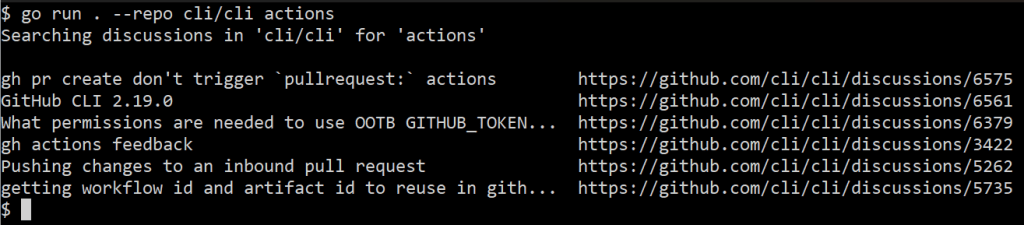
Running the extension gives me this result now:
Note how the discussion titles are truncated.
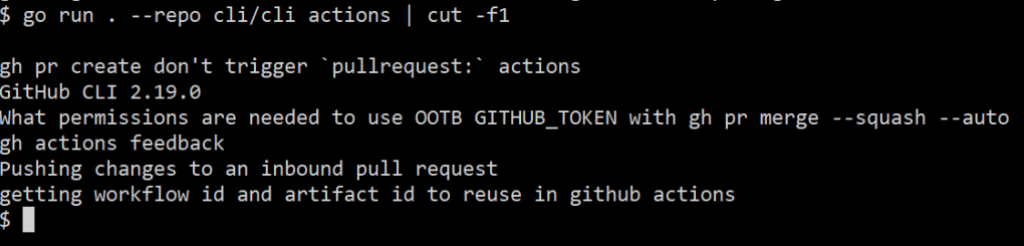
If I pipe this elsewhere, I can use a command like cut to see the discussion titles in full:
Adding the tableprinter improved both human readability and scriptability of the extension.
Opening browsers
Sometimes, opening a browser can be helpful as not everything can be done in a terminal. go-gh has a function for this, which we’ll make use of in a new flag that mimics the “feeling lucky” button of a certain search engine. Specifying this flag means that we’ll open a browser with the first matching result to our search term.
I’ll add a new flag definition to the top of the main function:
go
func main() {
        lucky := flag.Bool("lucky", false, "Open the first matching result in a web browser")
    // rest of code below here
funcmain() {
lucky := flag.Bool("lucky", false, "Open the first matching result in a web browser")
// rest of code below here
And, then add this before I set up the table printer:
go
        if len(matches) == 0 {
                fmt.Println("No matching discussion threads found :(")
        }

        if *lucky {
                b := browser.New("", os.Stdout, os.Stderr)
                b.Browse(matches[0].URL)
                return
        }

    // terminal and table printer code
iflen(matches) == 0 {
fmt.Println("No matching discussion threads found :(")
}
if *lucky {
b := browser.New("", os.Stdout, os.Stderr)
b.Browse(matches[0].URL)
return
}
// terminal and table printer code
JSON output
For extensions with more complex outputs, you could go even further in enabling scripting by exposing JSON output and supporting jq expressions. jq is a general purpose tool for interacting with JSON on the command line. go-gh has a library version of jq built directly in, allowing extension authors to offer their users the power of jq without them having to install it themselves.
I’m adding two new flags: --json and --jq. The first is a boolean and the second a string. They are now the first two lines in main:
go
func main() {
    jsonFlag := flag.Bool("json", false, "Output JSON")
    jqFlag := flag.String("jq", "", "Process JSON output with a jq expression")
funcmain() {
jsonFlag := flag.Bool("json", false, "Output JSON")
jqFlag := flag.String("jq", "", "Process JSON output with a jq expression")
After setting isTerminal, I’m adding this code block:
go
isTerminal := term.IsTerminal(os.Stdout)
        if *jsonFlag {
                output, err := json.Marshal(matches)
                if err != nil {
                        return fmt.Errorf("could not serialize JSON: %w", err)
                }

                if *jqFlag != "" {
                        return jq.Evaluate(bytes.NewBuffer(output), os.Stdout, *jqFlag)
                }

                return jsonpretty.Format(os.Stdout, bytes.NewBuffer(output), " ", isTerminal)
        }
isTerminal := term.IsTerminal(os.Stdout)
        if *jsonFlag {
                output, err := json.Marshal(matches)
                if err != nil {
                        return fmt.Errorf("could not serialize JSON: %w", err)
                }

                if *jqFlag != "" {
                        return jq.Evaluate(bytes.NewBuffer(output), os.Stdout, *jqFlag)
                }

                return jsonpretty.Format(os.Stdout, bytes.NewBuffer(output), " ", isTerminal)
        }
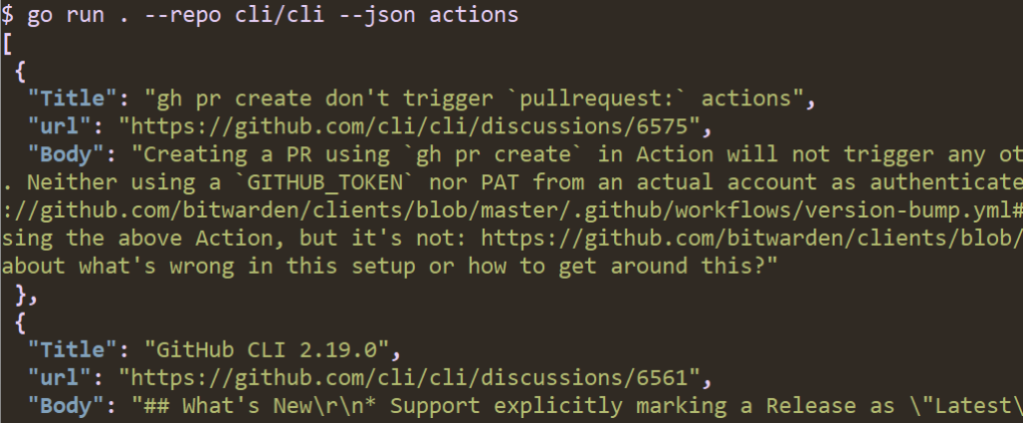
Now, when I run my code with --json, I get nicely printed JSON output:
If I specify a jq expression I can process the data. For example, I can limit output to just titles like we did before with cut; this time, I’ll use the jq expression .[]|.Title instead.
Now that I have a feature-filled extension, I’d like to make sure it’s easy to create releases for it so others can install it. At this point it’s uninstallable since I have not precompiled any of the Go code.
Before I worry about making a release, I have to make sure that my extension repository has the gh-extension tag. I can add that by running gh repo edit --add-topic gh-extension. Without this topic added to the repository, it won’t show up in commands like gh ext browse or gh ext search.
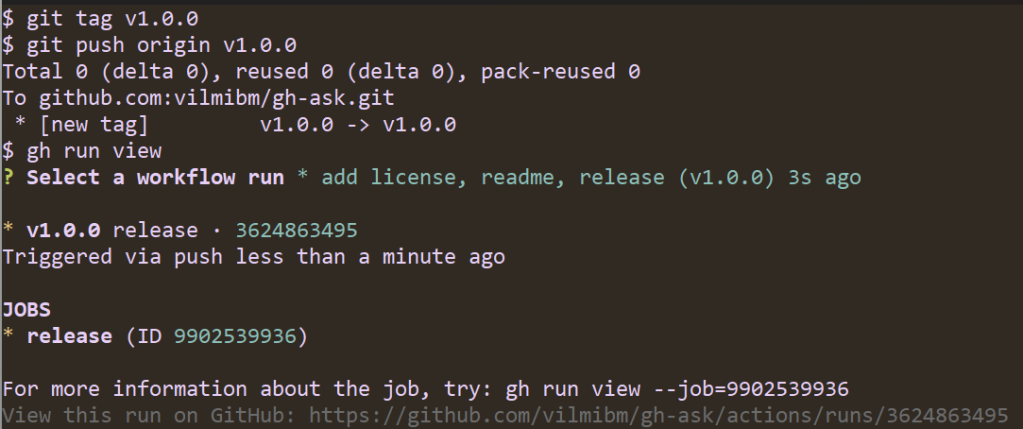
Since I started this extension by running gh ext create, I already have a GitHub Actions workflow defined for releasing. All that’s left before others can use my extension is pushing a tag to trigger a release. The workflow file contains:
The repository is public (assuming you want people to install this for themselves! You can keep it private and make releases just for yourself, if you prefer.).
You’ve pushed all the local work you want to see in the release.
To release:
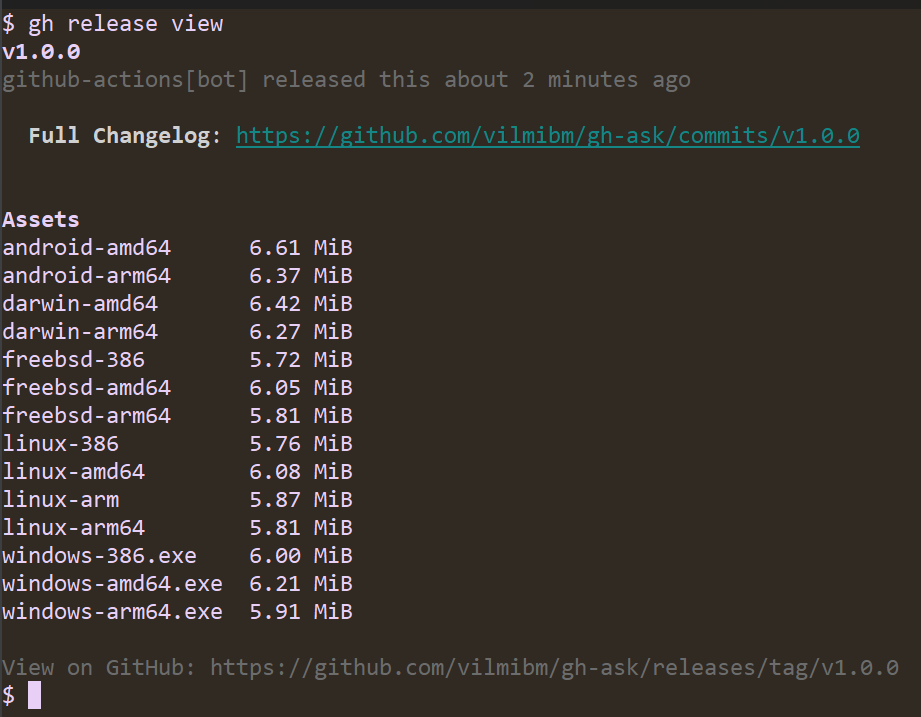
Note that the workflow ran automatically. It looks for tags of the form vX.Y.Z and kicks off a build of your Go code. Once the release is done, I can check it to see that all my code compiled as expected:
Now, anyone can run gh ext install vilmibm/gh-ask and try out my extension! This is all the work of the gh-extension-precompile action. This action can be used to compile any language, but by default it only knows how to handle Go code.
By default, the action will compile executables for:
Linux (amd64, 386, arm, arm64)
Windows (amd64, 386, arm64)
MacOS (amd64, arm64)
FreeBSD (amd64, 386, arm64)
Android (amd64, arm64)
To build for a language other than Go, edit .github/workflows/release.yml to add a build_script_override configuration. For example, if my repository had a script at scripts/build.sh, my release.yml would look like:
The script specified as build_script_overridemust produce executables in a dist directory at the root of the extension repository with file names ending with: {os}-{arch}{ext}, where the extension is .exe on Windows and blank on other platforms. For example:
dist/gh-my-ext_v1.0.0_darwin-amd64
dist/gh-my-ext_v1.0.0_windows-386.exe
Executables in this directory will be uploaded as release assets on GitHub. For OS and architecture nomenclature, please refer to this list. We use this nomenclature when looking for executables from the GitHub CLI, so it needs to be respected even for non-Go extensions.
The CLI team has some improvements on the horizon for the extensions system in the GitHub CLI. We’re planning a more accessible version of the extension browse command that renders a single column style interface suitable for screen readers. We intend to add support for nested extensions–in other words, an extension called as a subcommand of an existing gh command like gh pr my-extension–making third-party extensions fit more naturally into our command hierarchy. Finally, we’d like to improve the documentation and flexibility of the gh-extension-precompile action.
Are there features you’d like to see? We’d love to hear about it in a discussion or an issue in the cli/cli repository.
It is our hope that the extensions system in the GitHub CLI inspire you to create features beyond our wildest imagination. Please go forth and make something you’re excited about, even if it’s just to make gh do fun things like run screensavers.




![A screenshot of running "go run . --repo cli/cli --json --jq '.[]|.Title' actions" in a terminal. The output is a list of discussion thread titles.](https://github.blog/wp-content/uploads/2023/01/image6.png?w=1024&resize=1024%2C212)