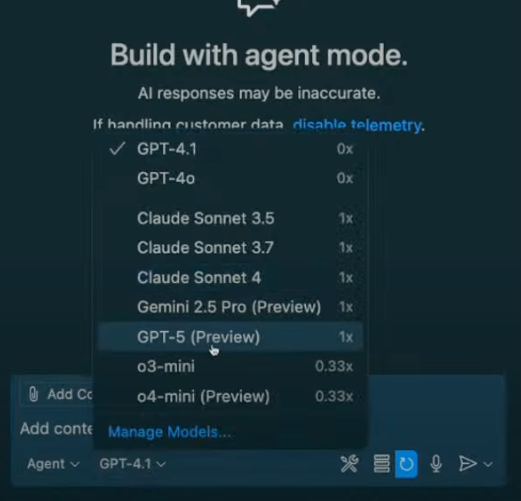
What an exciting time to be a developer! GPT-5 just dropped and it’s already available in GitHub Copilot. I was literally watching OpenAI’s livestream when they announced it, and I couldn’t contain my excitement — especially knowing we could start building with it immediately with our favorite AI peer programmer.
If you’ve been following our Rubber Duck Thursday streams, you know I love exploring new AI models and tools. This stream was all about two game-changing releases: GPT-5 and the GitHub Model Context Protocol (MCP) server. And wow, did we cover some ground!
Let me walk you through what we built, what we learned, and how you can start using these powerful tools in your own development workflow today.
GPT-5 is OpenAI’s most advanced model yet, and the best part? It’s now available to use in your favorite IDE. You can access it in ask, edit, and agent modes in VS Code — which is incredible because not all models are available across all modes.
What really impressed me was the speed. This is a reasoning model, and the response time was genuinely faster than I expected. When I was building with it, suggestions came back almost instantly, and the quality was noticeably different.
Enterprise note: If you’re using GitHub Copilot through your company, enterprise and business administrators need to opt in to enable GPT-5 access. Chat with your IT team if you don’t see it available yet.
I wanted to put GPT-5 to the test immediately, so I asked my stream audience what I should build. The overwhelming response? A game! Someone suggested Magic Tiles (which, I’ll be honest, I had no idea how to play). But that’s where GPT-5 really shined.
Here’s my approach when building with AI (what I call spec-driven development):
When I realized the game needed better user instructions, I asked:
Can you provide user instructions on how to play the game before the user clicks start?
Can you provide user instructions on how to play the game before the user clicks start?
GPT-5 immediately updated the HTML with clear instructions and even gave me suggestions for next features. This iterative approach felt incredibly natural, like having a conversation with a very smart coding partner.
MCP is a standard for connecting AI assistants to external tools and applications. Think of it as a bridge that lets your large language model (LLM) talk to:
GitHub repositories and issues
Gmail accounts
SQL servers
Figma projects
And so much more
Without MCP, your LLMs live in isolation. With MCP, they become powerful automation engines that can interact with your entire development ecosystem.
MCP follows a client-server architecture, similar to REST APIs. In VS Code, for example, VS Code acts as both the host (providing the environment) and the client (connecting to MCP servers).
I previously built a project called “Teenyhost” (a clone of Tiinyhost for temporarily deploying documents to the web), and I want to create a repository for it. Instead of manually creating a GitHub repo, I simply asked Copilot:
Can you create a repository forthis project called teenyhost?
Can you create a repository for this project called teenyhost?
- Repository name: teenyhost
- Owner: my GitHub username
- Visibility: public
- Optional description
I provided these details, and within seconds, Copilot used the MCP server to:
Create the repository on GitHub
Push my local code to the new repo
Set up the proper Git remotes
This might seem simple, but think about the workflow implications. How many times have you been deep in a coding session and wanted to quickly push a project to GitHub? Instead of context-switching to the browser, you can now handle it with natural language right in your editor.
Here’s where things get really interesting. I asked Copilot:
What additional features and improvements can I implement inthis app?
What additional features and improvements can I implement in this app?
It came back with categorized suggestions:
Low effort quick wins
Core robustness improvements
Enhanced user experience features
Advanced functionality
Then I said:
Can you create issues for all the low effort improvements inthis repo?
Can you create issues for all the low effort improvements in this repo?
And just like that, Copilot created five properly formatted GitHub issues with:
Descriptive titles
Detailed descriptions
Implementation suggestions
Appropriate labels
Think about how powerful this is for capturing project ideas. Instead of losing great suggestions in Slack threads or meeting notes, you can immediately convert conversations into actionable GitHub issues.
GPT-5’s processing speed is genuinely impressive. This isn’t just about faster responses — it’s about maintaining flow state while building. When your AI assistant can keep up with your thought process, the entire development experience becomes more fluid.
What I love about this setup is that you maintain control. When Copilot wanted to push directly to the main branch, I could cancel that action. The AI handles the tedious parts while you make the important decisions.
The combination of GPT-5 and GitHub MCP server represents a significant shift in how we interact with our development tools. We’re moving from manual, interface-driven workflows to conversational, intent-driven automation.
On our next Rubber Duck Thursday, I’m planning to build our first custom MCP server from scratch. I’ve never built one before, so we’ll learn together — which is always the most fun way to explore new technology.